Posts
Samsung’s New Ballie Robot Is Like a Real-Life Mini BB-8
Jay Peters, writing at The Verge:
Today, at Samsung’s keynote at CES, Samsung introduced Ballie, a small ball-shaped robot intended to help you around the house. Samsung says Ballie utilizes AI to be a security robot, a fitness assistant, a tool to help seniors connect with smart devices in their homes, and it can even be a friend to your kids and pets.
In an onstage demo, Ballie followed Samsung consumer electronics division CEO H.S. Kim on the stage by rolling around, seemingly by using the camera to track Kim as he walked across the stage. Ballie also gave cute little robotic chimes in response to a couple of commands from Kim, and it even rolled right into Kim’s hands when he called for it.
Meet #Ballie, Samsung’s human-centric vision of robots that takes personalized care to the next level. The small rolling robot, “understands you, supports you, and reacts to your needs.” #CES2020 #SamsungCES2020 pic.twitter.com/YzwgZN1Lgw
— Samsung US Newsroom (@SamsungNewsUS) 7 January 2020
I need one.
I don’t care about it opening the blinds, turning on TVs, or anything. I want a little robot that can make whimsical noises, look remotely like a BB8, play with my cat, and do absolutely nothing else.
Where do I send my money?
Saying Goodbye to a Few Apps
I’ve been talking about this for a few years, but refining my App Store offerings has always been a target of mine. And today I’m taking another bit of action on that.
Which means my list of 8 products on the respective App Stores will go from 8 down to 5, by retiring Pretty Regular Expressions for macOS and iOS, and Tap Gap:
- Text Case iOS/iPadOS
- Text Case macOS
- Pixels Sticker Pack (iMessage Sticker Pack)
- SOLID – Wallpaper Generator
- Qwiki
Pretty Regular Expressions iOSPretty Regular Expressions macOSTap Gap – Fast Paced Accuracy Game
The reasons behind the three of them are slightly different but are essentially due to a lack of focus from myself, and a desire to not have any lingering apps anymore. Especially if I feel like they’re offering a substandard experience.
Pretty Regular Expressions is an app that is arguably still useful, but I haven’t used it myself in quite some time, and it’s fallen way behind its competitors on both platforms. And it’s just in a good state, it hasn’t really been adapted to the new devices over the years, and there’s tons of work needed to bring it back to a good level. There’s still a chance that I’ll revive this in the future, as I plan on working on a fresh app this year, but I can’t make any promises.
And for Tap Gap, this is a really simple game that I made while at university. It’s wasn’t ever a great game, and it was last updated December 2016, so I’m not even sure it works on the new devices. That was an easy decision.
There’s also question marks over my solid colour wallpaper app, SOLID, and my Wikipedia Menu Bar app for Mac, Qwiki. However, these still function correctly and attract new users.
That leaves me with arguably one active product, Text Case, since the macOS app is built with Catalyst, meaning it’s essentially one codebase. And three passive products with the sticker pack, Qwiki, and SOLID.
How To Expand Launchpad
Shihab Mehboob (@JPEGuin) shared a useful tip on Twitter, where you can expand the amount of rows and columns in Launchpad.
Turns out you can do this by altering the following values via Terminal:
defaults write com.apple.dock springboard-rows -int 8
defaults write com.apple.dock springboard-columns -int 8
For these changes to have effect, you’ll need to restart the Dock. You can do this via Activity Monitor or by typing killall Dock.
Here’s what mine looks like on my 16″ MBP:

So much better than the massive icons that come by default.
Kohler Puts an Alexa-Enabled Smart Speaker in a Showerhead
James Vincent, writing at The Verge:
If you like to listen to tunes in the morning, then Kohler has just the over-the-top product for you: a portable smart speaker with built-in Alexa that slots right into your showerhead.
I’ll be adding this to the list of things that I don’t think need to exist.
First Evidence Found of Tool Use by Seabirds
Bob Yirka, writing at Phys.org:
Three researchers from the University of Oxford and the South Iceland Nature Research Centre have found evidence of tool use by puffins—the first evidence of tool use by any seabird. In their paper published in Proceedings of the National Academy of Sciences, Annette Fayet, Erpur Snær Hansen and Dora Biro describe their evidence of puffins using sticks to scratch a part of their body.
[…]
The researchers note that the bird in their recording lived on Grimsey Island in Iceland, where birds suffer from parasites in their plumage. They further note that last year was known to be a particularly bad year for tick infestations. They suggest using a sharp stick might have been more effective at removing the pests than beaks. They also note that because they witnessed tool use in two locations separated by a wide distance, it appears likely that tool use among puffins is common.
Which Emoji Scissors Close
Here’s an interesting bit of Emoji research:
Ah, scissors. They’re important enough that we have an emoji for them. On your device, it appears as ✂️. Unlike the real world tool it represents, the emoji’s job is to convey the idea, especially at small sizes. It doesn’t need to be able to swing or cut things. Nevertheless, let’s judge them on that irrelevant criterion.
Text Case 2.5
There’s yet another update to Text Case, and it brings with it three new formats, theme syncing, and an action extension for the macOS version!
New Formats
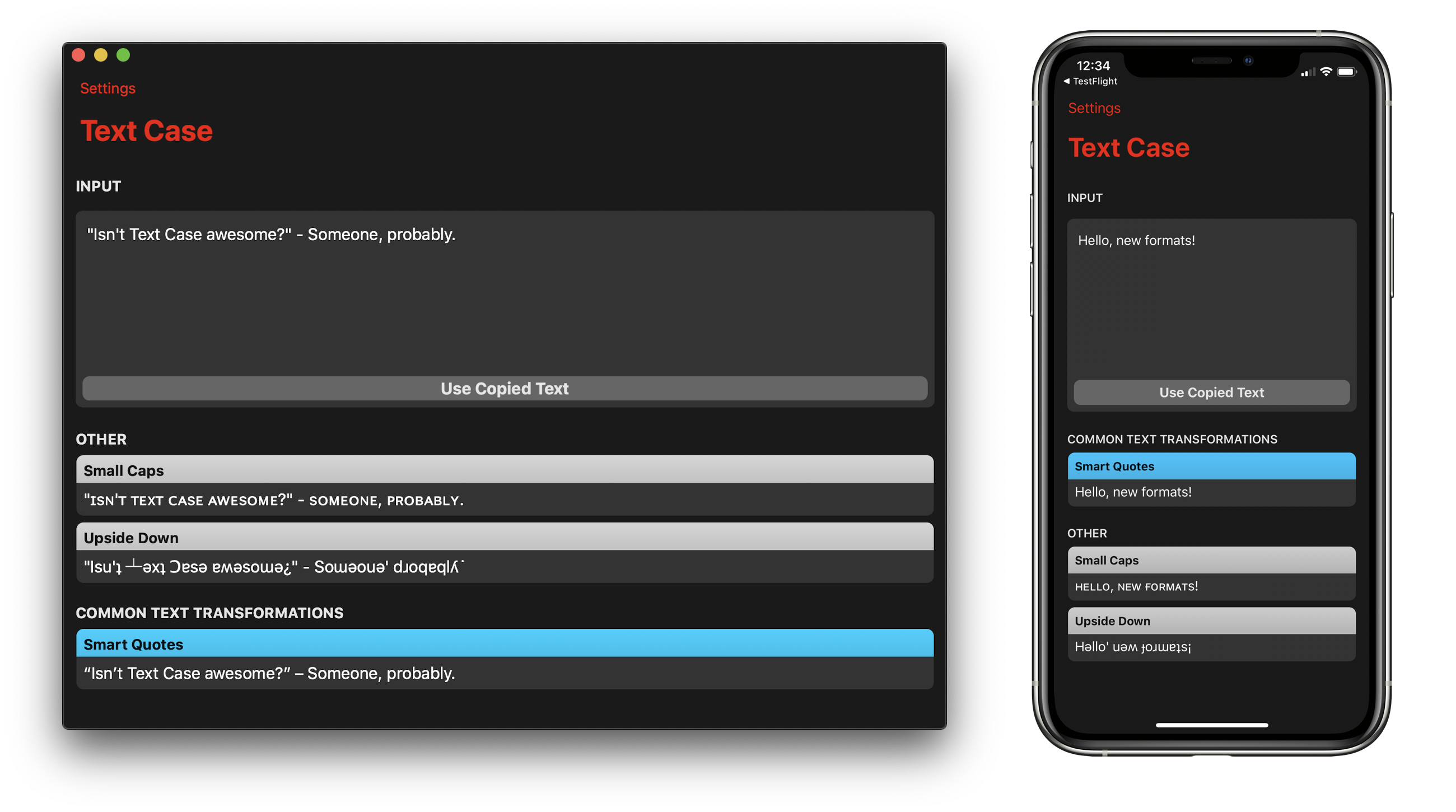
Smart Quotes – This changes any straight single of double quotation marks, into their curly equivalents, all based on your localisation.
Small Caps – ᴛᴜʀɴ ʏᴏᴜʀ ᴛᴇxᴛ ɪɴᴛᴏ sᴏᴍᴇᴛʜɪɴɢ ʟɪᴋᴇ ᴛʜɪs!
Upside Down – Just another fun one, this attempts to flip the characters upside down.
These new formats are available on all versions of Text Case, iOS, iPadOS, and macOS.
Automatic Theme Syncing
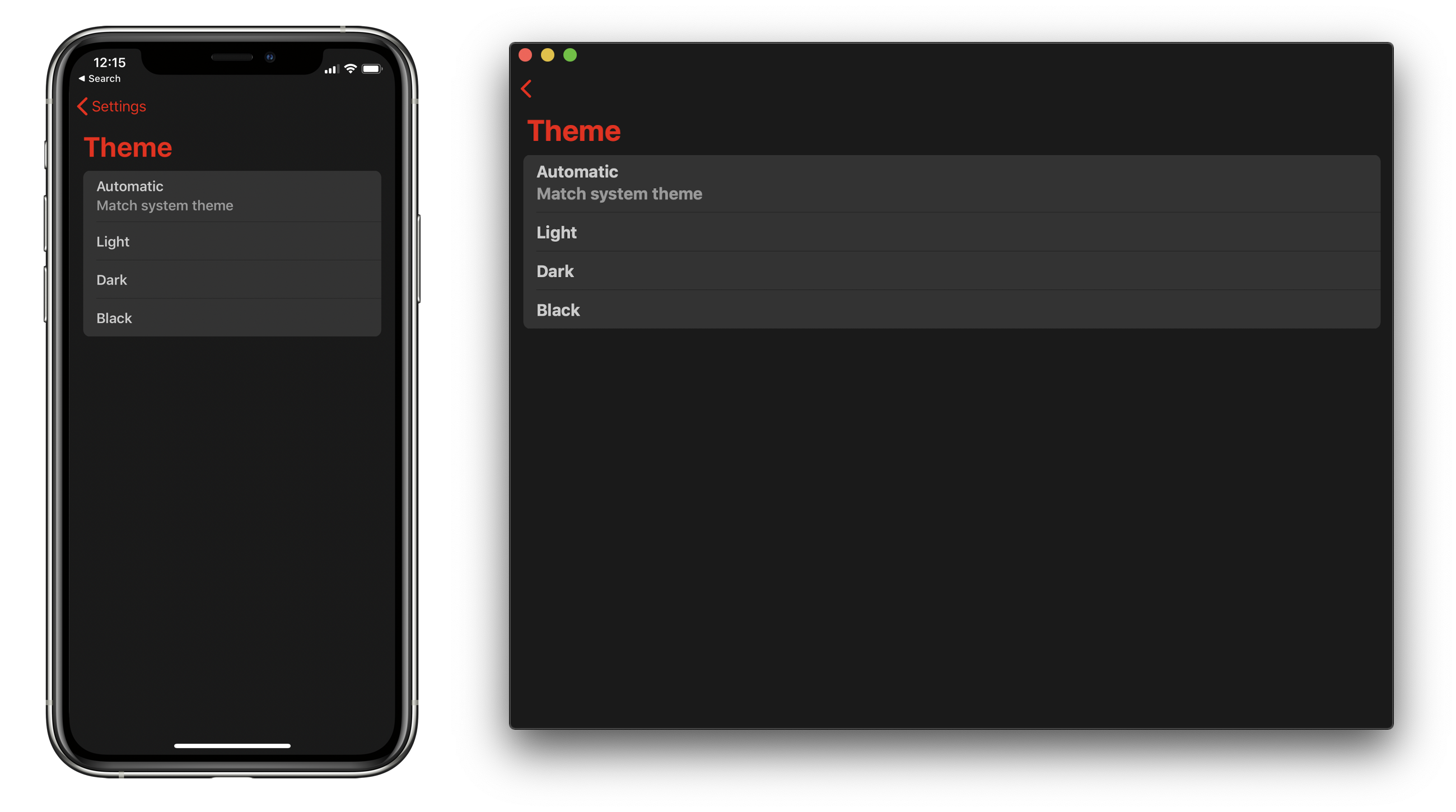
Text Case has support for themes, but previously you would have to manually switch between them. With this version, you can select “Automatic” to have the Text Case theme sync with the light/dark mode of your system. This works on both iOS, iPadOS, and macOS!
Format Text Action Extension for macOS
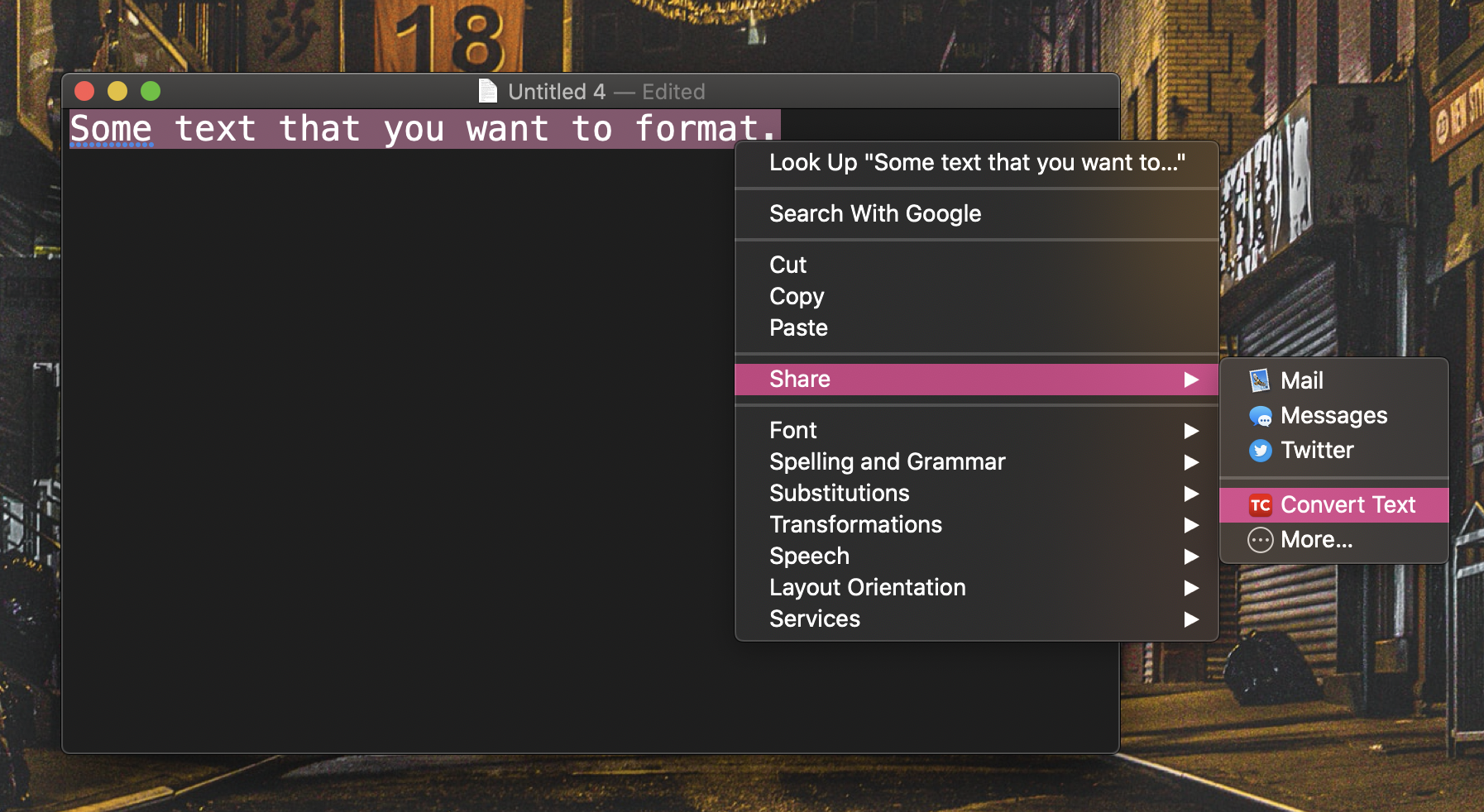
On the iOS/iPadOS version of Text Case, there’s an Action Extension that lets you select text anywhere, and then get direct access to the different formats in Text Case. This is now coming to the macOS version, with essentially the same behaviour.
Now you can select a portion of text anywhere in macOS, right-click, and under “Share”, there should be a “Convert Text” action. (If it doesn’t appear, you will have to go to System Preferences, Extensions, Actions, etc enable it.)
That will bring up the Text Case UI, and selecting a format will result in the formatted text being copied to your clipboard!
Links

Text Case for Mac
I’ve been slowly working on this for quite a few months now, but I think it’s finally time to release Text Case for Mac.
With it comes all 32 formats that are currently supported in the iOS app, and the same customisation options (except custom app icons).
To recap all of those:
- Title Case (AP, APA, CMOS, MLA)
- URL Encoded/Decoded
- Uppercase
- Lowercase
- Capitalise
- Capitalise Words
- Sentence Case
- Reversed
- Strip HTML
- Strip/Trim Whitespace
- Markdown Blockquote
- Markdown Code Block
- Markdown Ordered/Unordered List
- Markdown to HTML
- Camel Case
- Snake Case
- Pascal Case
- Kebab Case
- Hashtags
- Mocking Spongebob
- Emoji
- Base64 Encoded/Decoded
- Rot13
- Clap Case
- Shuffled
In fact the macOS version is 2.4.4, and the iOS version is sitting at just 2.4.3. The only differences being some improvements to the Emoji format, where some localisations could cause the format to not work at all (it now defaults to English if it doesn’t support the language). And also some macOS specific changes, which are mainly to remove parts of the app that won’t work such as Siri Shortcuts support, and also fine tuning the macOS experience.
There are things that I’m already planning on adding the Mac version, such as an Extension so you can format text from outside the app, similar to how the Action Extension works in IOS, and also other automation support such as URL schemes. However, I feel that it’s much more beneficial for people to have Text Case for Mac now, rather than waiting even longer to get it into peoples hands. Because just like the iOS app, I really like to adapt the app to users feedback, and I already have a few extra formats (such as small caps) that I plan on adding soon. I also want to see what I can do with the Touch Bar!
Have a look at the Mac version:


Bring Back the iPod Click Wheel With Rewound
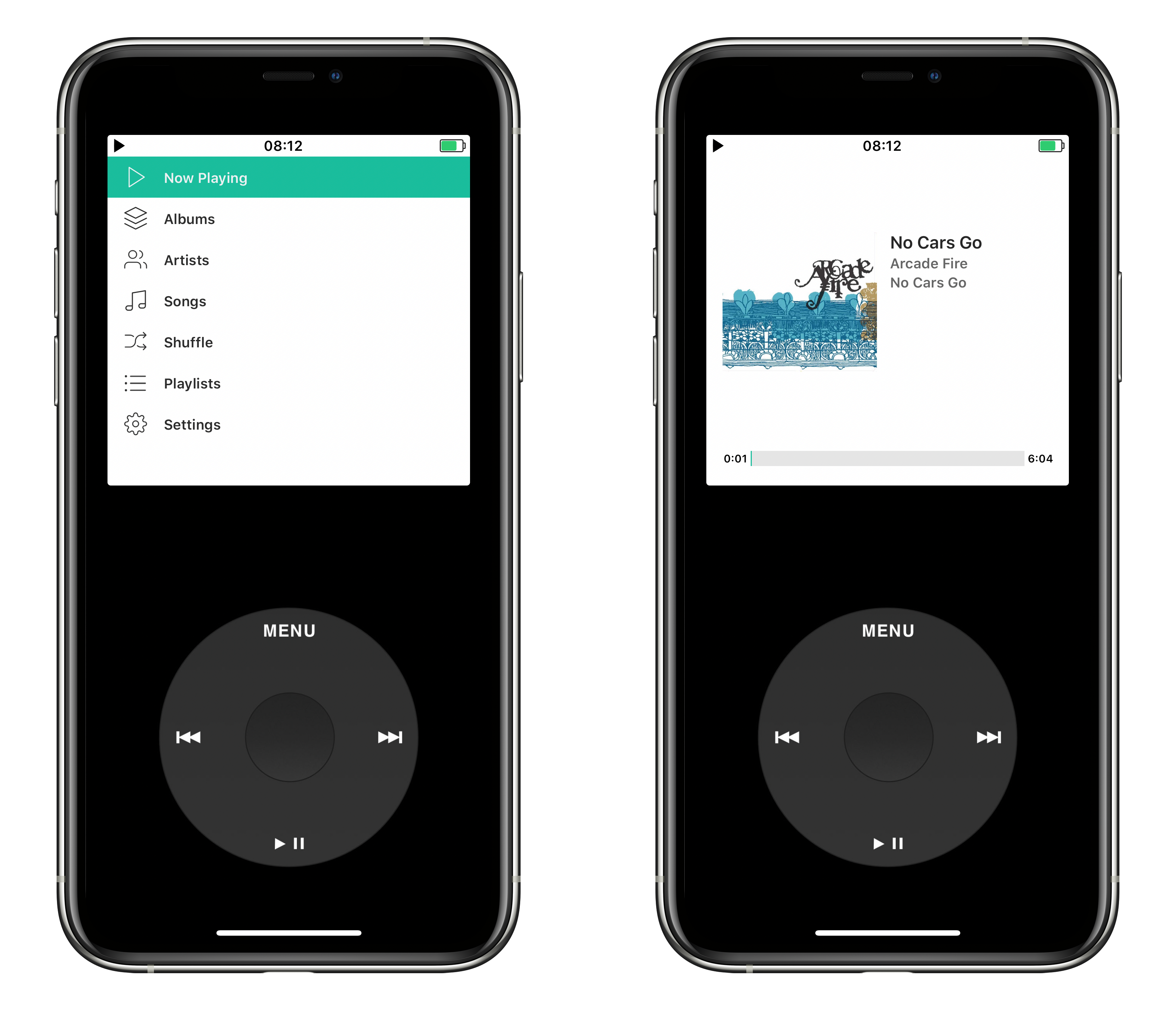
I came across a fun app recently on Twitter, called Rewound. It’s a Music app that simply acts as an interface to your music library, but it comes with a rather interesting quirk, it looks like an old iPod. And you can even go back to a click wheel.
 .
.
The control layout can be changed within the app, however to apply a matching skin you have to download them from Twitter/Weibo (You can find them with the #rewoundskins hashtag) or add custom photos from your device.
Depending on the skin you add, it automatically assigns a layout based on the size. And if you use one with a click wheel, you will actually be able to use the circular gestures to navigate through your music collection.
It’s a bit of fun, and I’m sure some nostalgic people will love to see it. I can’t quite say I see this as a long term product though!
Download Rewound for free on the App Store
Update: 18th December 2019
It turns out that Apple have now rejected Rewound, and it’s no longer available to download. (via Michael Tsai)
The Voice at Embankment Tube Station
John Bull (@garius) posted a great story on Twitter, about one of the announcements at Embankment tube station, and a voice that suddenly went unheard.
It is election season. The world is busy and rubbish.
But it is also Christmas.
So take a breather and let me tell you a story about London, trains, love and loss, and how small acts of kindness matter.
I’m going to tell you about the voice at Embankment Tube station.
— John Bull (@garius) 11 December 2019
Just before Christmas 2012, staff at Embankment Tube station were approached by a woman who was very upset.
She kept asking them where the voice had gone. They weren’t sure what she meant.
The Voice?
The voice, she said. The man who says ‘Mind the Gap’
— John Bull (@garius) 11 December 2019
Don’t worry, the staff at Embankment said. The announcement still happens, but they’ve all been updated. New digital system. New voices. More variety.
The staff asked her if she was okay.
“That voice,” she explained, “was my husband.”
— John Bull (@garius) 11 December 2019
The woman, a GP called Dr Margaret McCollum, explained that her husband was an actor called Oswald Laurence. Oswald had never become famous, but he HAD been the chap who had recorded all the Northern Line announcements back in the seventies.
And Oswald had died in 2007.
— John Bull (@garius) 11 December 2019
Oswald’s death had left a hole in Margaret’s heart. But one thing had helped. Every day, on her way to work, she got to hear his voice.
Sometimes, when it hurt too much, she explained, she’d just sit on the platform at Embankment and listen to the announcements for a bit longer.
— John Bull (@garius) 11 December 2019
For five years, this had become her routine. She knew he wasn’t really there but his voice – the memory of him – was.
To everyone else, it had just been another announcement. To HER it had been the ghost of the man she still loved.
And now even that had gone.
— John Bull (@garius) 11 December 2019
The staff at Embankment were apologetic, but the whole Underground had this new digital system, it just had to be done. They promised, though, that if the old recordings existed, they’d try and find a copy for her.
Margaret knew this was unlikely, but thanked them anyway.
— John Bull (@garius) 11 December 2019
In the New Year, Margaret McCollum sat on Embankment Station, on her way to work.
And over the speakers she heard a familiar voice. The voice of a man she had loved so much, and never thought she’d hear again.
“Mind the Gap” Said Oswald Laurence.
— John Bull (@garius) 11 December 2019
Because it turned out a LOT of people at Embankment, within London Underground, within @TfL and beyond had lost loved ones and wished they could hear them again.
And they’d all realised that with luck, just this once, for one person, they might be able to make that happen.
— John Bull (@garius) 11 December 2019
Archives were searched, old tapes found and restored. More people had worked to digitize them. Others had waded through the code of the announcement system to alter it while still more had sorted out the paperwork and got exemptions.
And together they made Oswald talk again.
— John Bull (@garius) 11 December 2019
And that is why today, even in 2019, if you go down to Embankment station in London, and sit on the northbound platform on Northern Line, you will here a COMPLETELY different voice say Mind the Gap to ANYWHERE else on the Underground.
It’s Oswald.
Merry Christmas everyone.
— John Bull (@garius) 11 December 2019
When I started to read this story, I was thinking that maybe the archived recording would be found and then a copy sent to Dr McCollum. I never expected the voice to be digitised, restored, and then put back in use.
The fact that it’s only used in the Embankment tube station on the Northern Line makes it even better. It’s amazing that people went the extra mile and put in the work to make it happen.