Text Case is Alive Again
On the very last day of 2025, I wrote a post here with my plans for the upcoming year. When I talked about projects, I had two goals, the first being:
Finish and release a revamped Text Case iOS and macOS app.
Well, it's mid-November, and that has finally been achieved.
Text Case version 2026.1 has finally arrived, with a massive internal overhaul and tweaks that hopefully no one will notice, along with quite a few new features.
A better way to build a flow
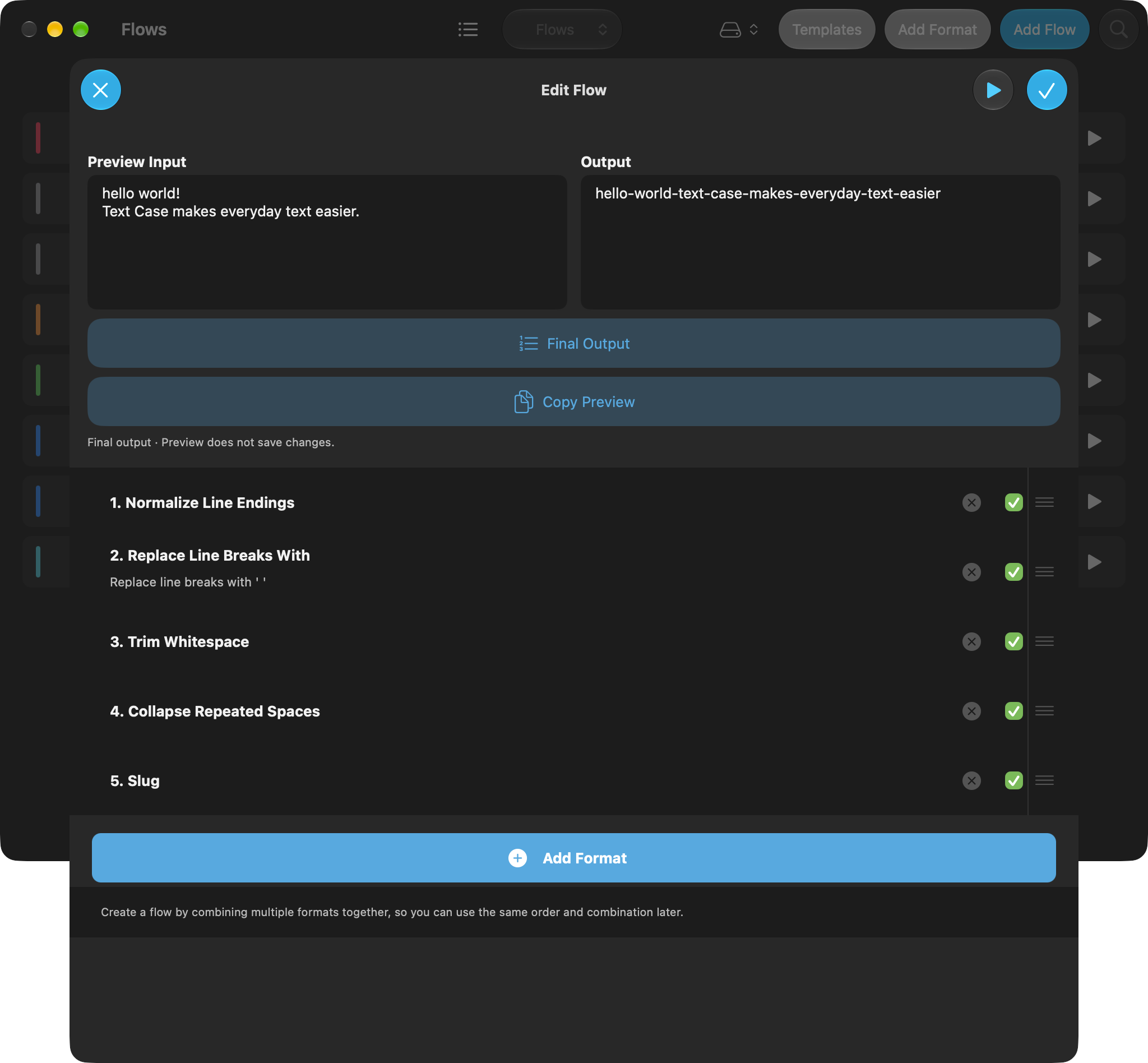
First off, flow building has been improved, and it now should be easier for you to combine various formats to create your desired transformation. Previously, you would need to assemble the formats in the right order, and then run the flow to see the result. But now as you're building the flow, you can preview the current format, while quickly adding/removing formats, toggling them on/off, and reordering them.
If you're building something more complex, and need to debug certain steps, or want to make sure you've got everything working correctly, that should now be possible.
Templates
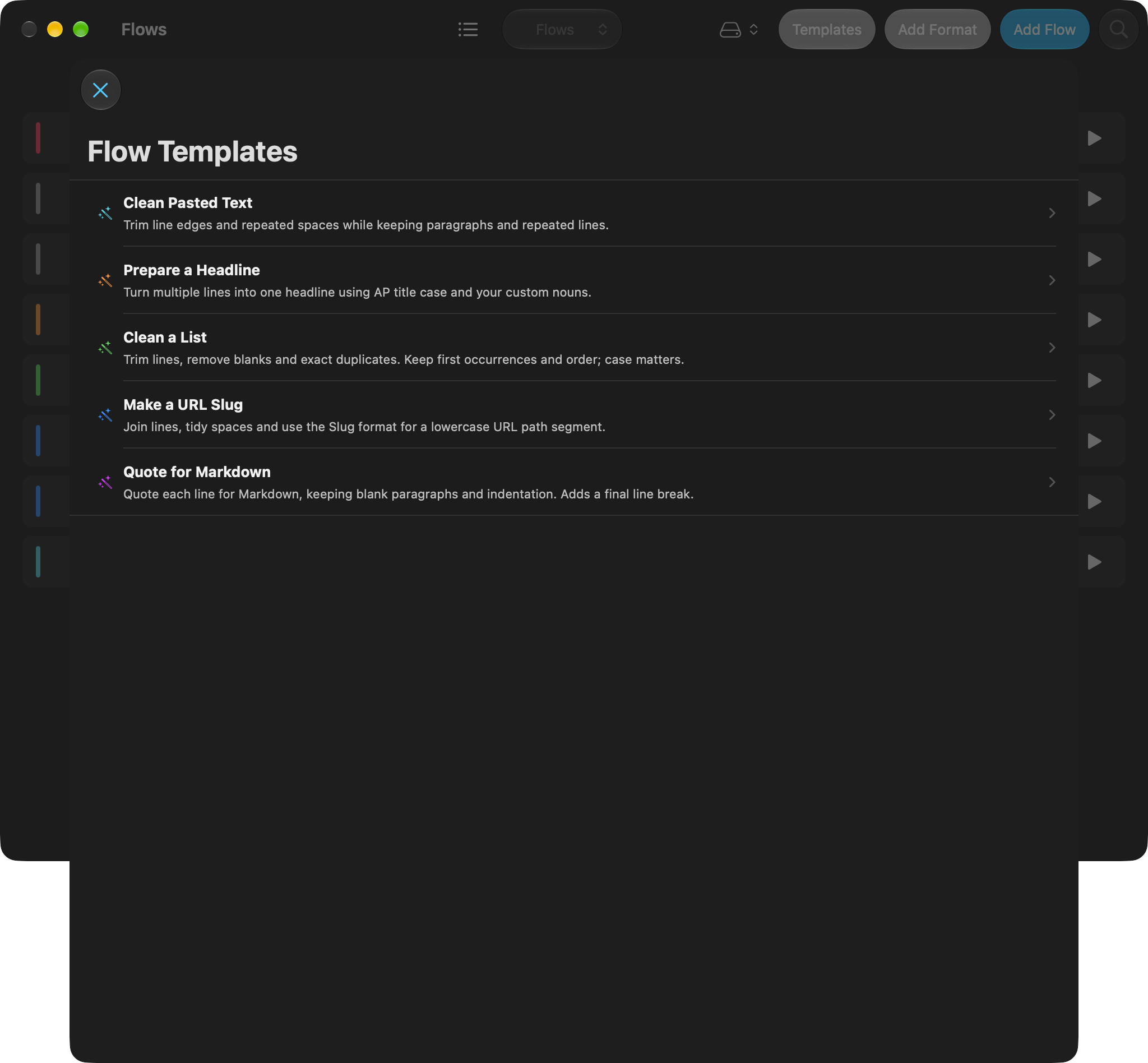
You may want to start creating flows, but not know where to start. There are now five built-in templates to give you some ideas, and can give you something to build from.
Flows as files
Flows can now be shared as files. You can open one from Files on iOS, double-click it in Finder on the Mac, or drop it onto the Flows list. Here are two to try:
Scratchpad improvements
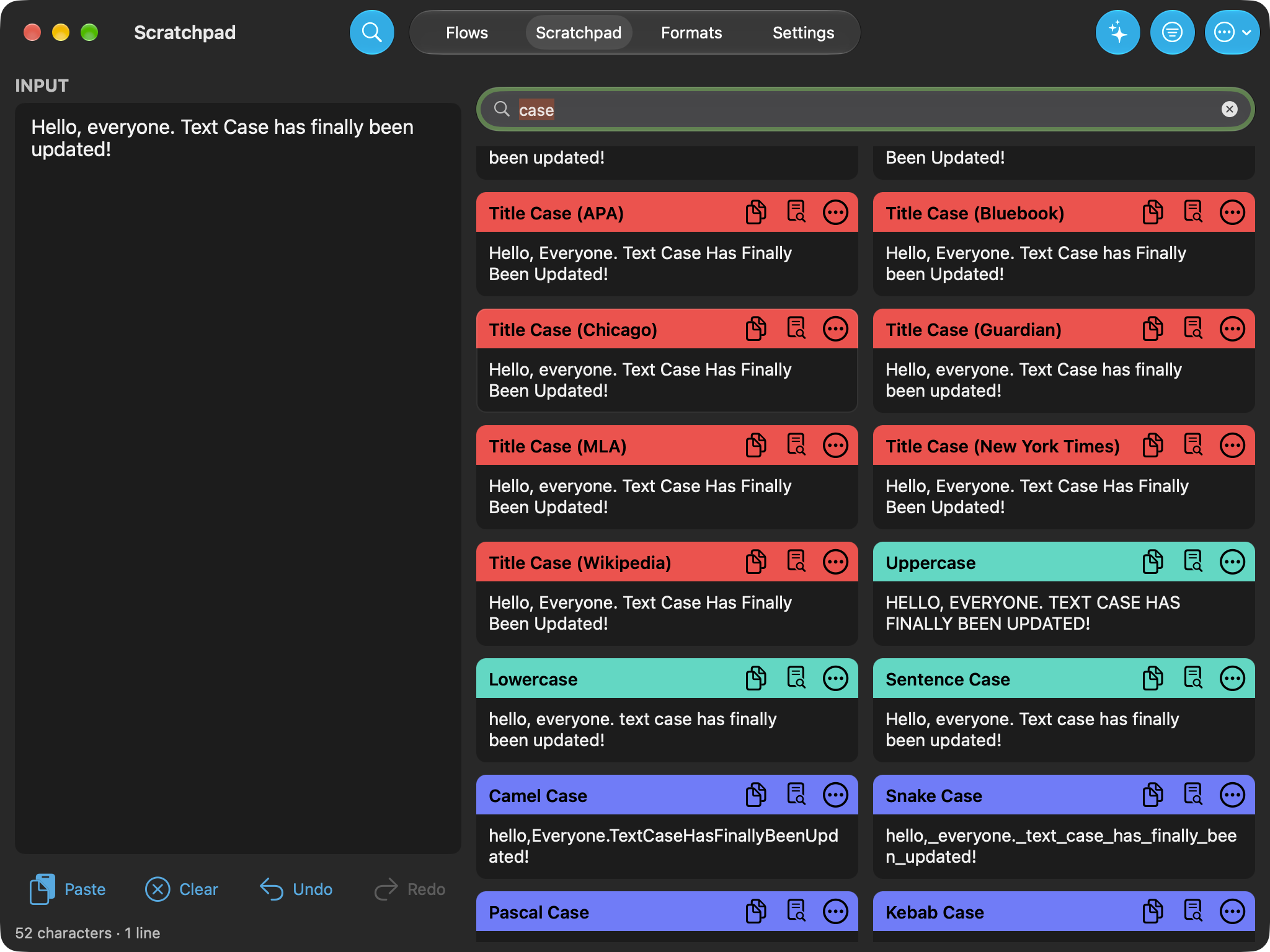
Scratchpad is the main place for quickly formatting text. Especially if you want to quickly see results from multiple flows/formats at the same time. It was already pretty good in my personal opinion, but there's quite a few handy additions that will make it just a bit more handy, such as:
- Format/flow searching
- Favourite formats/flows
- List/grid view mode.
- Chain formats by selecting "Use as input"
- Undo/redo chained transformations
Now in your menu bar
You may not want to keep the main Text Case app open all the time, but when you want to quickly format some text, you can now do so from the menu bar. From there you can see your flows and favourite formats, or search through the whole list to find the one you want. Then after you choose the one you want, it will transform the text on your clipboard.
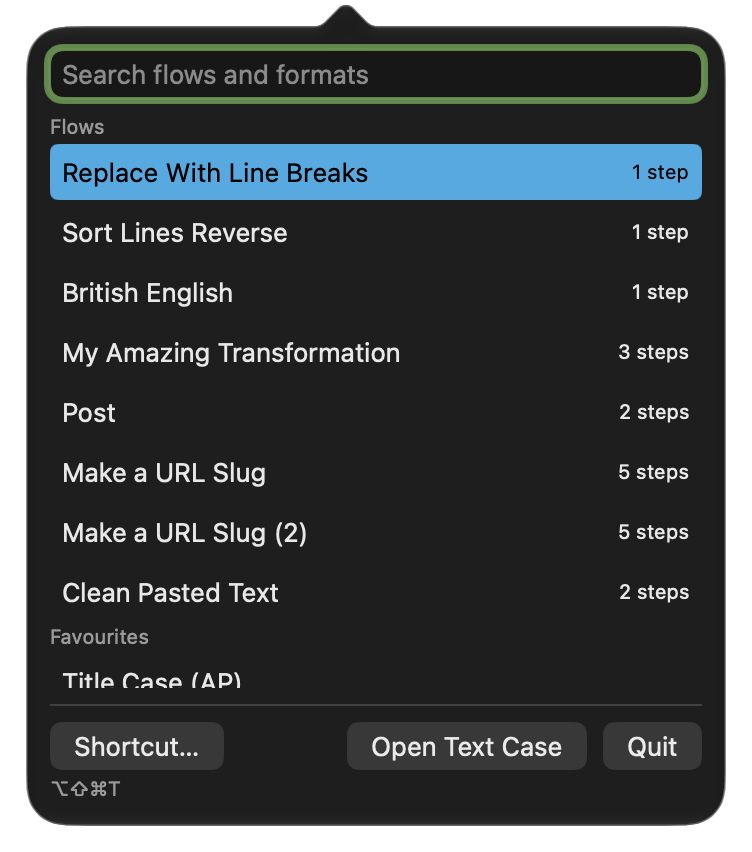
You can also do this just from your keyboard. CMD + SHIFT + OPTION + T will launch the menu bar app, and you can then navigate and choose a format by typing.
Prompt-formats?
With Apple's on-device Apple Intelligence available, I thought it only made sense to integrate this into Text Case.
Now a format can be a simple prompt. Then every time you run, it uses the on-device model to transform your input. I think it could be handy for the weird formats that are hard to pin down to exact transformations without doing really crazy things.
For example, I’ve made for myself that "translates" American English to British English. You can download the British English flow.
Getting the update
Text Case 2026.1 is available on the App Store for iPhone and iPad and the Mac App Store. It requires iOS, iPadOS or macOS 26 or later. It’s a one-time purchase on each listing, and the update is free if you already have Text Case, including if you picked it up while it was free.
I’ve also rebuilt textcase.app. The new site has the full release notes, more screenshots and a press kit.
If you’ve been using Text Case during the years I wasn’t updating it, I can't thank you enough for sticking around. And if you've created an interesting flow, I'd love to see it.
P.S. There's another update on the way to Text Case with a whole new revamped theme system, and four quite different themes.

iPhone Duo
Apple have announced the long rumoured foldable iPhone, the iPhone Duo. It's expensive, and it's more than just a phone. I think I'm going to get one.
I'm not going to go into a big list of reasons why I want it, and the exact benefits it will give me. But I wanted to share my early impressions.
Admittedly, it's only just been announced, but it's already cleared up a few questions I had, and it's now got me thinking up more.
For starters, when I first saw the leaked images, the design didn't feel Apple to me. The hard vertical edge on the hinge, matched with the rounded corners on the other side didn't look right. The wider design also looked odd.
But after seeing the real design, and how the UI is arranged on the front and inner displays, made me forget those worries. Especially how it adapts to the new display ratio.
I also previously thought a foldable phone had two modes: open and closed. But the iPhone Duo looks like it can be more than that. You can use the front screen like a normal phone, you can open it up like a book, you can then rotate it to become a tablet, and it can even be folded into an A-shape and become a bedside alarm clock.
Something the Duo has which other iPhones don't is that it doesn't have the same silhouette as a traditional iPhone, so it doesn't carry the baggage of being familiar. To me, it feels more computer than phone.
Is it innovation? Other companies have released foldable phones already, and I'm an Apple fan, so I will always have a bias. But at least from the perspective of an iPhone user, it's innovation.
I remember when smartphones were getting bigger they were referred to as phablets. A sort of prematurely stretched smartphone that wasn't ready to be big. But then the iPhone 6 Plus arrived, and it felt more intentional. I think the Duo could be this type of product to existing foldable phones.
Miniroll UI Revamp
Miniroll, the blogroll platform I've been building has come quite a way since it's first inception. You can create and manage blogrolls, embed them on your site, create aggregated rss feeds, fetch your blogrolls via a JSON API, view a global feed of all public blogrolls, and a lot more.
But for a long time, the UI was a very simple, blocky, and overused monospace fonts for every UI element.
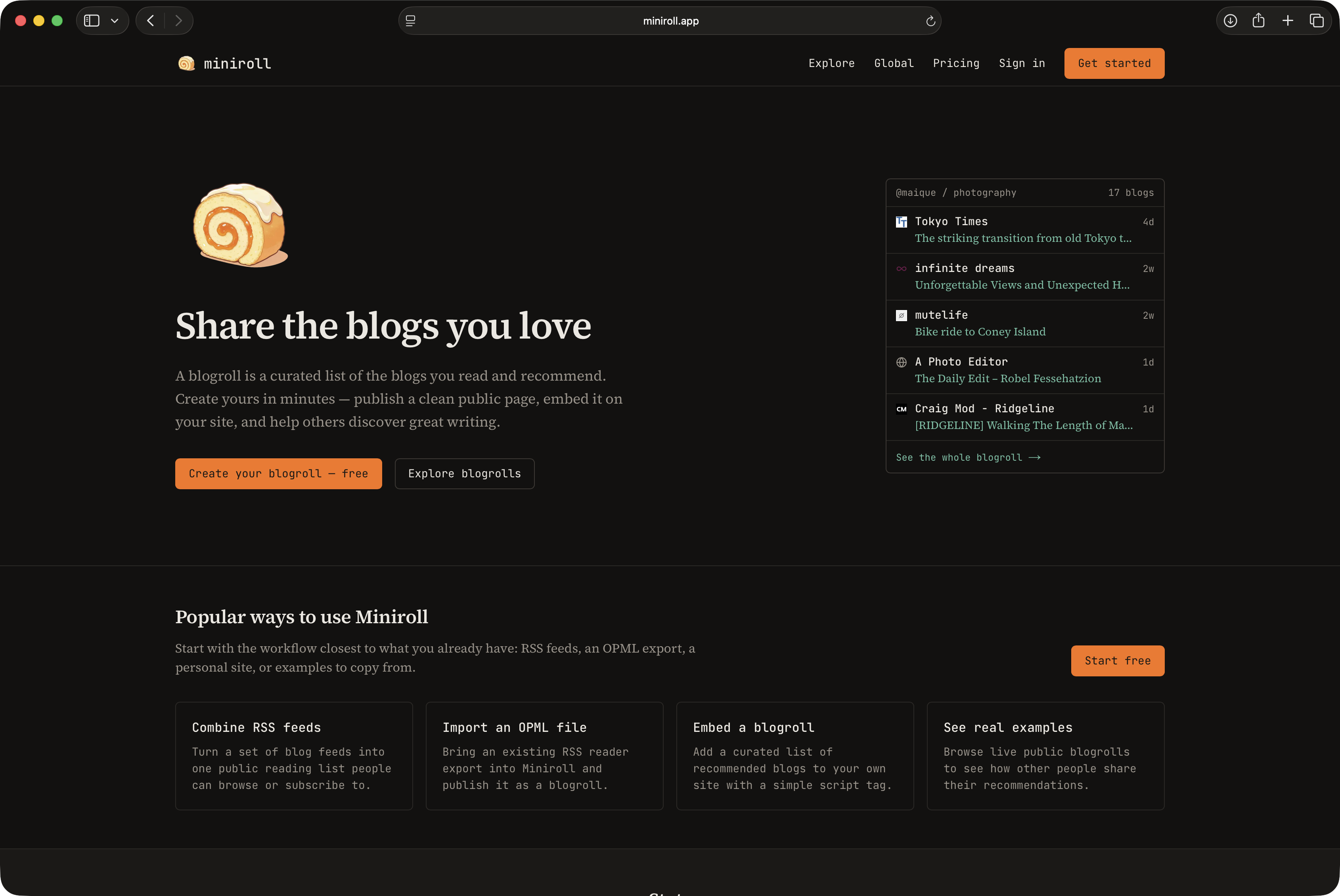
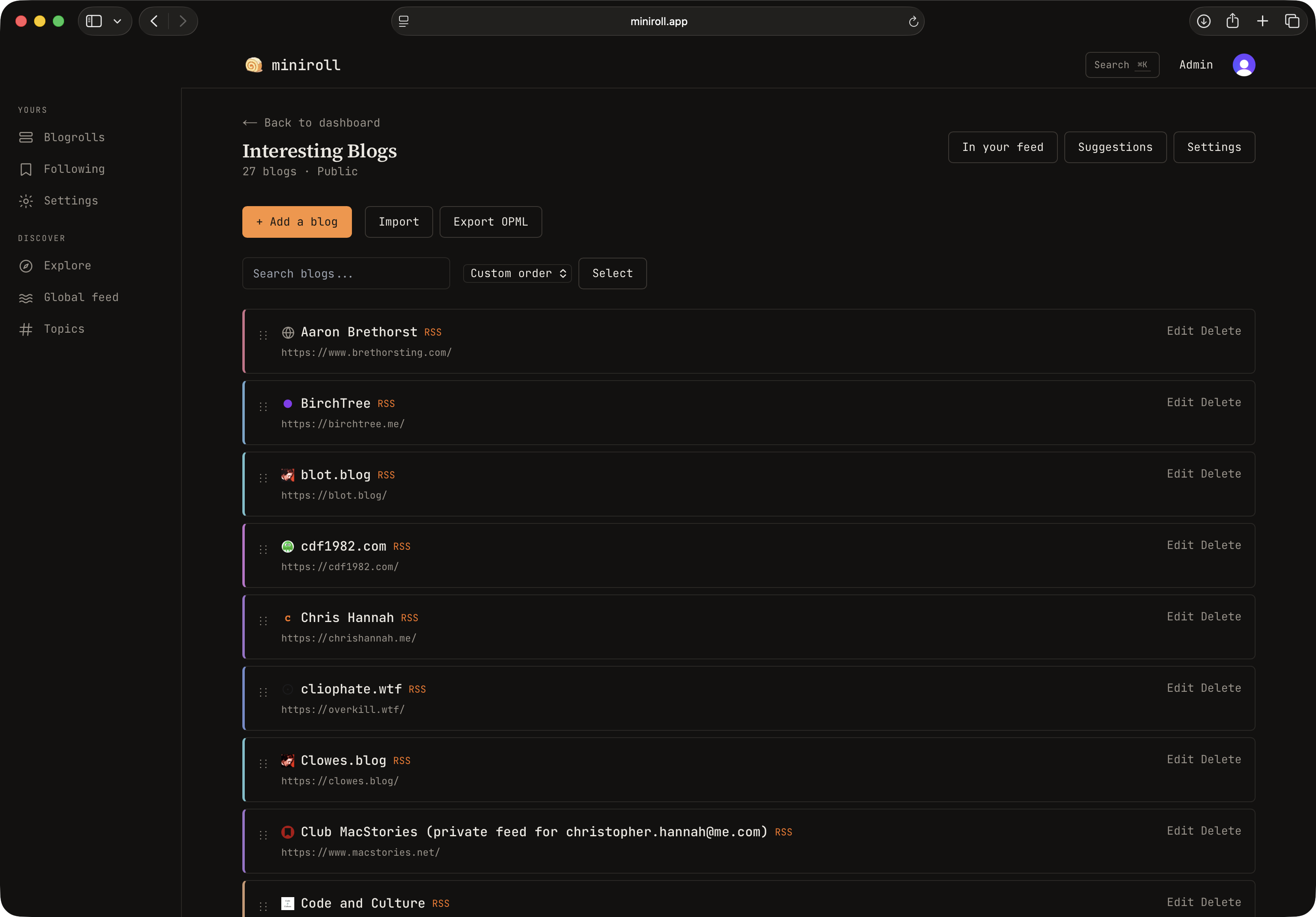
I decided that it was time for a revamp, so I first went over a bunch of small details, like rounded borders, accent colours with better contrast, and more readable fonts. After it was in a good state, I worked on a new interface for the platform, which is based around having a sidebar for navigation, and a better use of horizontal space where possible.
Here's a look at the updated landing page:
And what it looks like when you manage your blogroll:
In a lot of ways, it may seem minor, but I think it was a long needed refresh.
if you're interested in blogs, managing your blogrolls, and also using Miniroll to explore a bunch of blogs you may not have seen, then please check out Miniroll.
The paid subscription which gives you access to features such as different embed themes, analytics, stale blog detection, API access, and a load more, is $2 per month and $20 per year. But there's a 7-day free trial, so you can get a feel for the platform and see if it's for you before committing.
Do I Need an IDE Anymore?
I've managed to convince my work to let me swap my 16" M4 Pro MBP to a 14" model[1], which means I've now got the tedious task of migrating all my data, applications, and configurations, to my new machine. But it's also an oppurtinity to have a forced rethink of what I should install and set up on this new computer.
We use Java for most our services, so that basically means IntelliJ is the IDE that everyone uses.
However, like most other software engineers, we are making use of AI more and more every day. To the point where more focus is spent on system design than it is writing code, since the dirty work is mostly performed by an AI model. As for the AI tool I primarily use, that's Qoder. I use the CLI and the all-in-one IDE application.
It's made me think if I need to install IntelliJ at all. Given for the past month at least, I only use it to navigate a codebase, and use it as a "code reader". But Qoder can do that already. And if I want to use something else, there's much more lightweight options like VS Code that I can use.
I'm also now managing a team of 4 software engineers, so more and more of my work is spent communicating, reviewing PRs, analysing system designs, etc.
I wonder how long I can go without a "real" IDE installed.
We will start to do on call soon, and I don't want to carry a heavy laptop around with me. ↩︎
Code & Culture →
Last year I wrote a short post highlighting where I write on the internet. One of those places was a new blog called "Code and Culture", where I explained it was "a place where I can put my more serious writing".
I remember thinking back then, in an ideal world I'd start writing longer pieces quite regularly, and it would be my way of writing more essays. Instead, with a family, and a busy job, that didn't happen.
However, I have now published three pieces on the blog, so I felt it was about time I shared some links here.
- When Adulthood Actually Arrives - How my perspective changed after becoming a father.
- The Ownership Effect - The effect ownership and responsibility has on your actions.
- The Work Behind the Work - Short piece on quantifying my work after going from an individual contributor to a team lead.
Nine Years, Never the Same Job
I've been at my current company for just over 9 years. It seems a long time to be in a single place, but when I think about it, it hasn't really been the same job. And I think that's why I've managed to stay there for so long.
I started as an iOS Developer, then I was dabbling in some SpringBoot services, and also a bit of Terraform. That was about 2 to 3 years. Then the company was acquired, so we had a year of picking up a new bespoke tech stack, middleware, and ways of working. It started off with some back office functions as a way to understand the new system, then I moved to third-party integrations, and now for the past 3 years or so I've been focusing on card issuance, card processing, and the 3DS process. I think to an extent, when you change the domain you work in, it can feel like a new job. It helps to stop the job feeling boring.
Then there's the progress side of it. While I started as an "iOS Developer", it was my first professional role, so I was practically a junior. So I had the normal progression of moving up to becoming a senior engineer, and then in the past 2 years I've had the opportunity to become a team lead. That started as just taking more of a role in the architectural design process, helping with planning projects, and also being more of a lead in the team.
I'm now at a point where I manage 2 junior engineers, and one senior engineer, with another junior on the way. It's definitely going to force me to learn new skills, probably more coaching and delegation, but I expect it will be interesting.
All this isn't to say, "wow look at me, my career is so interesting", more of a reminder to myself and maybe others, that staying a long time in the same company doesn't always mean doing the same thing, and if you are finding your role boring, there are more options than just leaving and finding a new company.
For example I had someone that joined just after me, and for the first few years they had a similar progression, from mobile to backend, then moving to a new domain. But they were a Senior engineer from the beginning, and had no interest in learning new domains, or progressing in their role, either to become a team lead, or just progress as an individual contributor. After a while they sort of regressed into a mid-level engineer. Job satisfaction wasn't great in their latter years.
Before they eventually left, they were questioning me about how I've managed to stay for so long. In a way you could think that odd, seeing as we were there practically the same amount of time. But the question was more about how I've managed to stay for so long and managed to both stay interested in the job, and cope with the stress of keeping up with high demands of delivering projects regularly, supporting existing projects, and having the time to also learn. My answer was along the lines of "well I haven't exactly been doing the same thing for 9 years." Which is the truth, but not the whole truth. I could tell that they felt as if we were having totally different experiences.
The truth is that I haven't been doing the same thing for 9 years. As I described at the start, I never went longer than 18 months or so without a change to my role, my level, the domain I worked in, or generally the type of work I was doing day-to-day. But it's not something that magically happened to me and not to them, and it wasn't about skills or simply who was better.
It's comparable to the phrase "make your own luck", which is essentially taking actions to increase your chances of success, with a key behaviour being open to new opportunities. When I was presented with the chance of moving to a new domain, learning a new language for a short project, or a new skill that had to be learned and shared with the team, I was always curious enough to put myself forward. That was replicated across the team, in both similar and different scenarios. Whereas the person I'm talking about never tried anything new, was never interested in any progression, never wanted to put any time into learning. A near zero level of curiosity. Which, to be honest, I felt was odd for a software engineer. Isn't that why we tinker with computers?
What AI Doesn't Scratch
I enjoy building with AI, whether it's at my day job or with personal projects. Because it scratches the itch of the builder in me that I don't always get when I'm writing every line of code.
It means that I can step back, and think more about the problem I'm solving, the system design, and of course building faster than I would if I did it all by hand. That's definitely been something I've enjoyed at my day job, as delivering code is not a bottleneck[1]. Now more emphasis is on your system design. Does it follow the existing standards and patterns? Can it be expanded later if the scope increases? It also gives you more time to think through edge-cases. Can the design handle them better, or can you build in the controls that ensure proper monitoring? Etc.
To some extent, it makes everyone an architect. And I think if you're abstracted away one level, where you are thinking more about how it behaves as part of a wider codebase and domain, you're less likely to make quick tradeoffs simply to deliver faster.
But there is one itch it doesn't scratch. At least not for me, and not yet.
It's the one where it's late at night, it's just you, you've got music playing on your headphones, and you're just programming. It's not always about building some big project, or working towards an idea that AI can help orchestrate and speed up.
Sure, it helps the builder that wants to build and ship products. But at least for me, writing prompts and coordinating agents isn't the same as actually getting into the code, and feeling like you're doing something.
Well, actually: "Delivering code was never the bottleneck" - Go away. ↩︎
I'm in bed, I have the windows wide open, and the fan on full blast, and I'm actually starting to feel cold. I'm very glad we're finally reaching the end of this heatwave.
So I guess that's what losing the Champions League feels like then.
At least we're still Premier League Champions.
There's just under 14 hours until the UEFA Champions League Final. Let's hope Arsenal can finally bring home the trophy. 🏆