Posts

iPhone 12 Pro Camera Review: Glacier NP
Since the iPhones are more cameras than anything else nowadays, I always value a photography focussed review more than a generic one looking at the phone as a whole. One person that always steps up to fill that need is Austin Mann, he's an incredible photographer, and always comes up with great reviews of the latest iPhones.
And he's now just dropped his review of the iPhone 12 Pro:
Hello from Glacier National park, MT!
I’ve been exploring this area, based out of our Airstream, testing the camera of the new iPhone 12 Pro in all kinds of conditions from bright and sunny to dark and snowy. (And all very cold!)
As always, Apple delivered a presentation with a punch and a lot of the focus was on the camera, especially the iPhone 12 Pro Max Camera. (Spoiler alert: that review will be coming in a few weeks and I can’t wait to see what the hardware in that thing can do.)
My driving question remains:
How will this new tech make our pictures and videos better?
The iPhone 12 Pro’s upgrades really rely on software, whereas the iPhone 12 Pro Max gets all the software upgrades and a major hardware upgrade. With the iPhone 12 Pro in hand this week, a lot of my focus has been on Ultra Wide Night mode, LiDAR autofocus, and exploring new capabilities in the software.
I must admit, I was excited when I saw his review was up, but then I saw it was focussed on the 12 Pro, wheras I have personally gone for the standard 12. So I was getting ready to regret not going for the Pro, but seeing as he focussed on the Wide and Ultra Wide lenses, I think it also served as a very good iPhone 12 review too.
I'm coming from an iPhone XS, so I never got to experience the camera of the iPhone 11 generation, and I keep hearing how good it was. And now Austin has proved the 12 can go even further. One thing that really surprised me was how good Night Mode is.
The 12 Pro Max will be an even more capable device, and I look forward to seeing Austin's review on that when it comes out. But one thing looks certain, the iPhone 12 and 12 Pro have fantastic cameras.
Photo credit: Austin Mann "Shot on iPhone 12 Pro w/ Ultra Wide in Night mode (on tripod). Apple Photos “Noir” filter applied."
The Winners of the 2020 Wildlife Photographer of the Year
Jason Kottke, writing at Kottke.org:
The winning photographs in the 2020 Wildlife Photographer of the Year contest have been announced by the Natural History Museum in London. Photos above by Shanyuan Li, Weiwei Zeng, and Greg du Toit.
I love to see photography contents, especially wildlife and nature ones, because there's always absolutely great photos. But my problem is keeping track of the various competitions. So it's lucky that I read Kottke.org, since it seems like he rarely misses any!
Anyway, this years Wildlife Photographer of the Year photos were amazing as always.
When I look at wildlife photos I'm always struck by thinking how hard each of them would have been to capture. I like nature photography, mainly because of the focus on composition and lighting. But throwing animals in the mix must makee it infinitely more difficult.
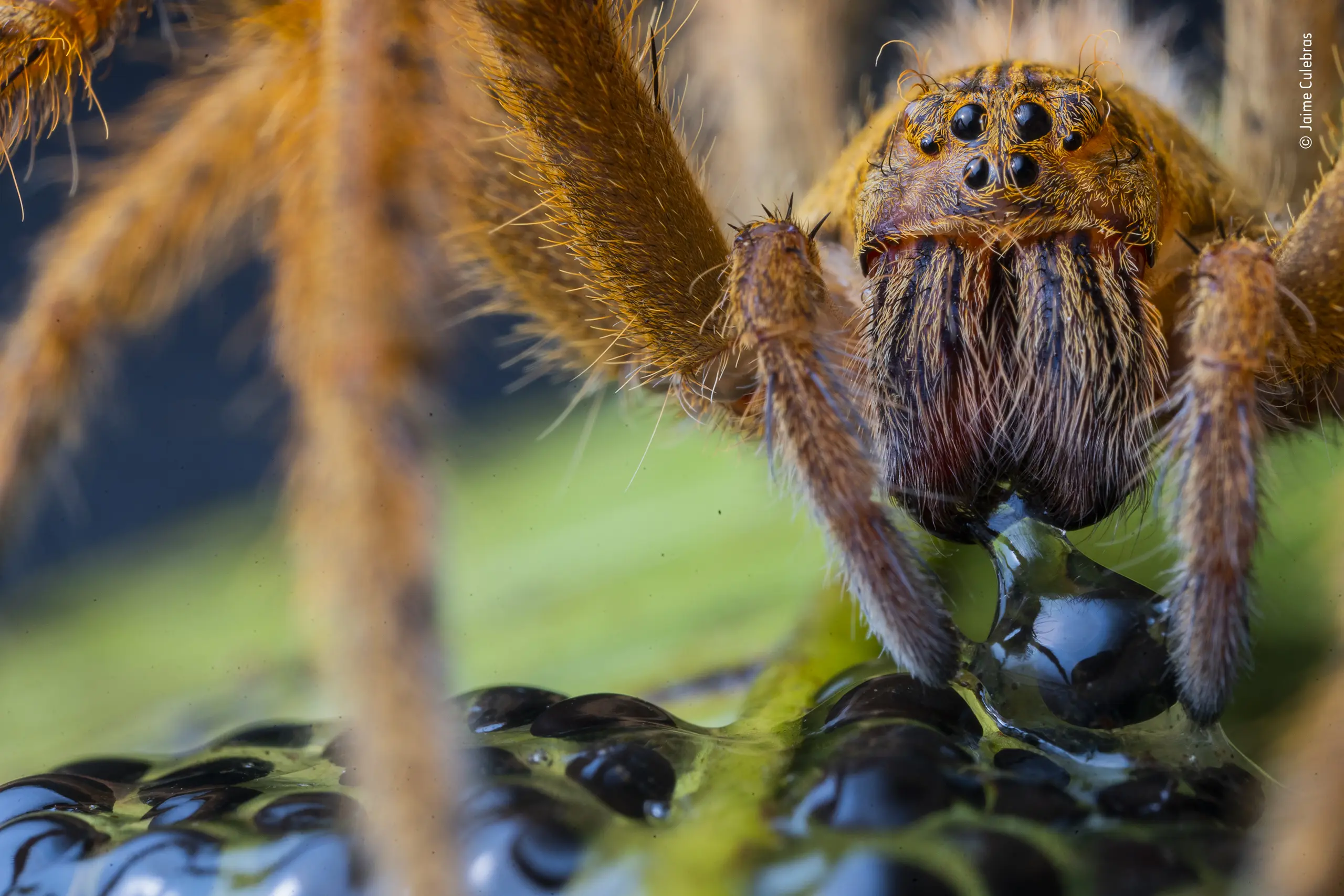
(Featured image: The Spider’s Supper by Jaime Culebras, one of the photos from the competition which was awarded a "Highly Commended" status)
Finally, a Small Phone I Can Buy
Joe Cieplinski, on how the latest iPhone lineup allowed him to choose a capable but smaller model this time round:
For at least a few hours, I was truly torn about which phone to get.But in the end, how could I not get the mini? There are exactly two sacrifices you make when getting this phone vs the new Pro: Battery life and camera. Everything else—from 5G, to the new Ceramic Shield glass, to the A14 Bionic, to FaceID, to OLED, to MagSafe—is pretty much the same.The iPhone 12 Pro is basically 100% aimed at photographers and videographers at this point. While I’ve never needed to get a Pro, this year I finally don’t even want to get a Pro. It took me a few hours to realize that, but now that I have, I can’t wait to get my hands on the mini.
While I wasn't looking for a smaller iPhone, I was hoping to get a "normal" sized model, that wasn't hamstrung too much by not being the biggest.
I also wanted a real colour this time, not a boring light grey or dark blue (or green like last years Pro models). But a bright colour, and those are typically only available on the non-Pro models, so you normally have to balance this choice against the tradeoffs of not getting a Pro model.
Everyones priorities when buying an iPhone will be different, and obviously not everyone will have a clear choice on which model is best for them. But this years lineup seems to be a very good fit for a lot of people.
Because, if you want a smaller iPhone, the 12 Mini is a very capable device, if you want something colourful, then the 12 is also very capable. And of course if you really want the best photography capabilities, you can go for the Pro or even Pro Max models. And that's if you want the best photography capabilities, the 12 Mini and 12 still have very good cameras.
The one extra model that I think would be good (Although, 5 models at once doesn't seem like an Apple thing to do), is a "normal" big iPhone. So in this case it would just be a 12 Max. Because I don't think wanting a big phone necessarily mean you need the Pro features.
Off the Tock
Becky Hansmeyer, talking about her feelings on the recent iPhone event, and not being as excited as in previous years:
I’ve always thought of the “S” models as being inherently cooler than their number-only counterparts. Every time I upgraded my phone, it got dramatically better. The iPhone 4s had an 8 megapixel camera, took 1080p video, and came with Siri. The 5s got the A7 chip and TouchID, and the 6s brought 3D Touch, a 12 megapixel camera, 4K video, and Live Photos. There was something exciting about being on that particular cycle and I find myself feeling the loss of that this year. I’m upgrading my phone, but I’m not pumped about it.
I had a similar experience. Maybe it was a big feature, or the annoying focus on 5G, but it just felt like there was no peak.
But, it could also be due to the fact that there's not that much more exciting things that can be done in a phone. Just like Becky mentions:
I will say, it’s getting harder and harder for me to imagine where cellular phones even go from here. If the new iPhones had gotten ProMotion displays and Touch ID sensors this year…like…what is even next? Maybe I’m just out of the loop, but I can’t even begin to envision the “next” thing.
Very true. It just doesn't look like there's a clear next step for phones. Some manufacturers are going with folding phones, but I still think this is a bit of a gimmick.
Maybe what we need is some real innovation. And I mean actual innovation, not adding a known technology to a phone, coming up with something different in order to change the game completely. And it doesn't look like anyone in the industry is really trying to do that.
The Differences between the iPhone 12 Mini, 12, 12 Pro, and 12 Pro Max
The differences between this years range of iPhones might not seem as apparent as they normally are. Because this time round, all four variants have the same Super Retina XDR display, A14 Bionic chip, Ultra and Wide cameras, and a few more things.
I'm currently trying to decide which model I will be going for this year, so I've been checking the Tech Spec pages a lot. I'm not sure if the difference between the 12 and the 12 Pro models are actually worth it to me, which I find as a shock. Seeing as usually I'm attracted to the biggest and best.
While going to the specs, I did put together a table of the differences between the four models. I don't think I've missed anything, but if I have please let me know. And note that it isn't simply a list of every detail about the phones, only the ones that differ.
| iPhone 12 Mini | iPhone 12 | iPhone 12 Pro | iPhone 12 Pro Max | |
|---|---|---|---|---|
| Storage Options | 64GB, 128GB, 256GB | 64GB, 128GB, 256GB | 128GB, 256GB, 512GB | 128GB, 256GB, 512GB |
| Display Size | 5.4" | 6.1" | 6.1" | 6.7" |
| Resolution | 2340x1080 | 2532x1170 | 2532x1170 | 2778x1284 |
| Pixel Density | 476 ppi | 460 ppi | 460 ppi | 458 ppi |
| Max Screen Brightness (typical) | 625 nits | 625 nits | 800 nits | 800 nits |
| Height | 131.5 mm | 146.7 mm | 146.7 mm | 160.8 mm |
| Width | 64.2 mm | 71.5 mm | 71.5 mm | 78.1 mm |
| Weight | 133 grams | 162 grams | 187 grams | 226 grams |
| Telephoto Lens | None | None | ƒ/2.0 2x | ƒ/2.2 2.5x |
| Apple ProRAW | No | No | Yes | Yes |
| OIS | Standard | Standard | Dual | Sensor-shift |
| Optical Zoom In (Photo/Video) | None | None | 2x | 2.5x |
| Digital Zoom | 5x | 5x | 10x | 12x |
| Night mode portraits | No | No | Yes | Yes |
| HDR Video Recording with Dolby Vision | Up to 30 fps | Up to 30 fps | Up to 60 fps | Up to 60 fps |
| OIS (Video) | Standard | Standard | Standard | Sensor-shift |
| Digital Zoom (Video) | 3x | 3x | 6x | 7x |
| Video playback | Up to 15 hours | Up to 17 hours | Up to 17 hours | Up to 20 hours |
| Video playback (streamed) | Up to 10 hours | Up to 11 hours | Up to 11 hours | Up to 12 hours |
| Audio playback | Up to 50 hours | Up to 65 hours | Up to 65 hours | Up to 80 hours |
| LiDAR Sensor | None | None | Yes | Yes |
The prices:
| iPhone 12 Mini | iPhone 12 | iPhone 12 Pro | iPhone 12 Pro Max | |
|---|---|---|---|---|
| 64GB | £699 | £799 | N/A | N/A |
| 128GB | £749 | £849 | £999 | £1,099 |
| 256GB | £849 | £949 | £1,099 | £1,199 |
| 512GB | N/A | N/A | £1,299 | £1,399 |
Here are the preorder date and times for the US and UK, along with the dates that they will be available:
| iPhone 12 Mini | iPhone 12 | iPhone 12 Pro | iPhone 12 Pro Max | |
|---|---|---|---|---|
| Preorder | ||||
| US (PDT) | 6th November 5:00 a.m. | 16th October 5:00 a.m. | 16th October 5:00 a.m. | 6th November 5:00 a.m. |
| UK | 6th November 1:00 p.m. | 16th October 1:00 p.m. | 16th October 1:00 p.m. | 6th November 1:00 p.m. |
| Available | 13th November | 23rd October | 23rd October | 13th November |
WordPress Can Now Turn Blog Posts into Tweetstorms Automatically
Sarah Perez, writing for Tech Crunch:
Earlier this year, WordPress .com introduced an easier way to post your Twitter threads, also known as tweetstorms, to your blog with the introduction of “unroll” option for Twitter embeds. Today, the company is addressing the flip side of tweetstorm publication — it’s making it possible to turn your existing WordPress blog post into a tweetstorm with just a couple of clicks.The new feature will allow you to tweet out every word of your post, as well as the accompanying images and videos, the company says. These will be automatically inserted into the thread where they belong alongside your text.
My immediate reaction when I first saw the headline, was "oh my god this is terrible". But after reading the article, I think it actually makes some sense for the world we live in right now.
As much as I dislike the situation, a lot more people read Twitter than they read blog posts. So in regard to your content being accessible, it's great. I still feel it moves away from content having a canonical place on the internet, but that could just be the idealist in me.
One part of me thinks that is a feature that will please some people, but I wouldn't use it for my own blog. Another part of me deep down, wants Ghost to add something similar so I can try it out.
Instead of Launching Social Media Apps, Why Not Take a Deep Breath First?
I came across a tweet regarding an interesting app idea yesterday. The app is called one sec, and it's developed by Frederik Riedel.
The idea behind the app is to enforce a few seconds to take a breath before opening a social media app. So for example, when you go to launch Instagram to mindlessly scroll for a few minutes, you will be asked to take a deep breath, and then you can decide whether you really want to open Instagram or not. A lot of times, I tend to open Instagram or TikTok simply out of boredom. And I think it's become a bit of a reflex. Sometimes I catch myself blindly opening Instagram, but I little kick every time I did would be helpful.
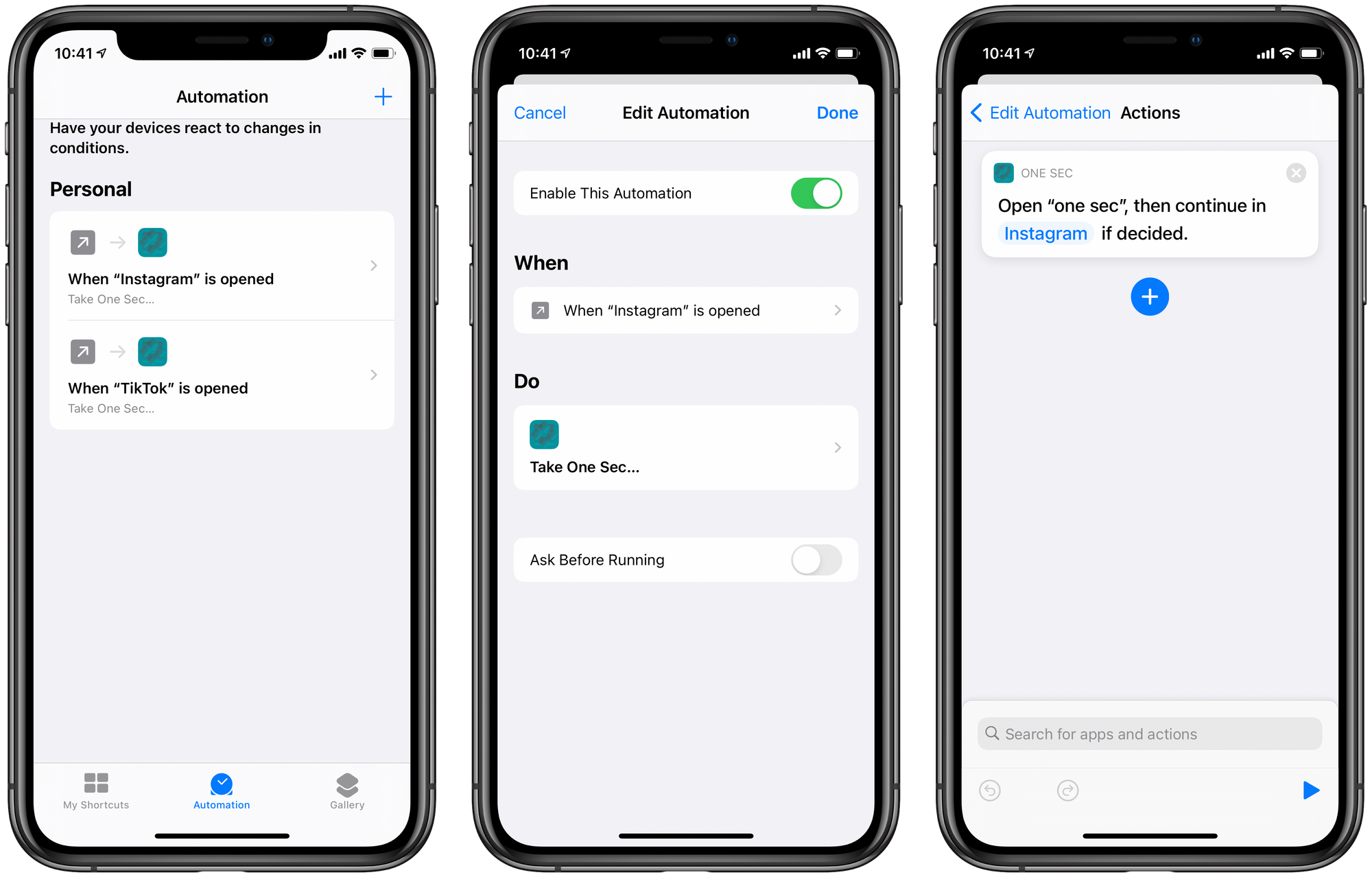
It works via the Shortcuts app, and specifically by using the automation feature of Shortcuts where you can assign actions to happen when a custom trigger is activated. In this case, you assign the "Take One Sec.." action to the a trigger for when a certain app is opened. This way the shortcut is launched every time you launch that app.
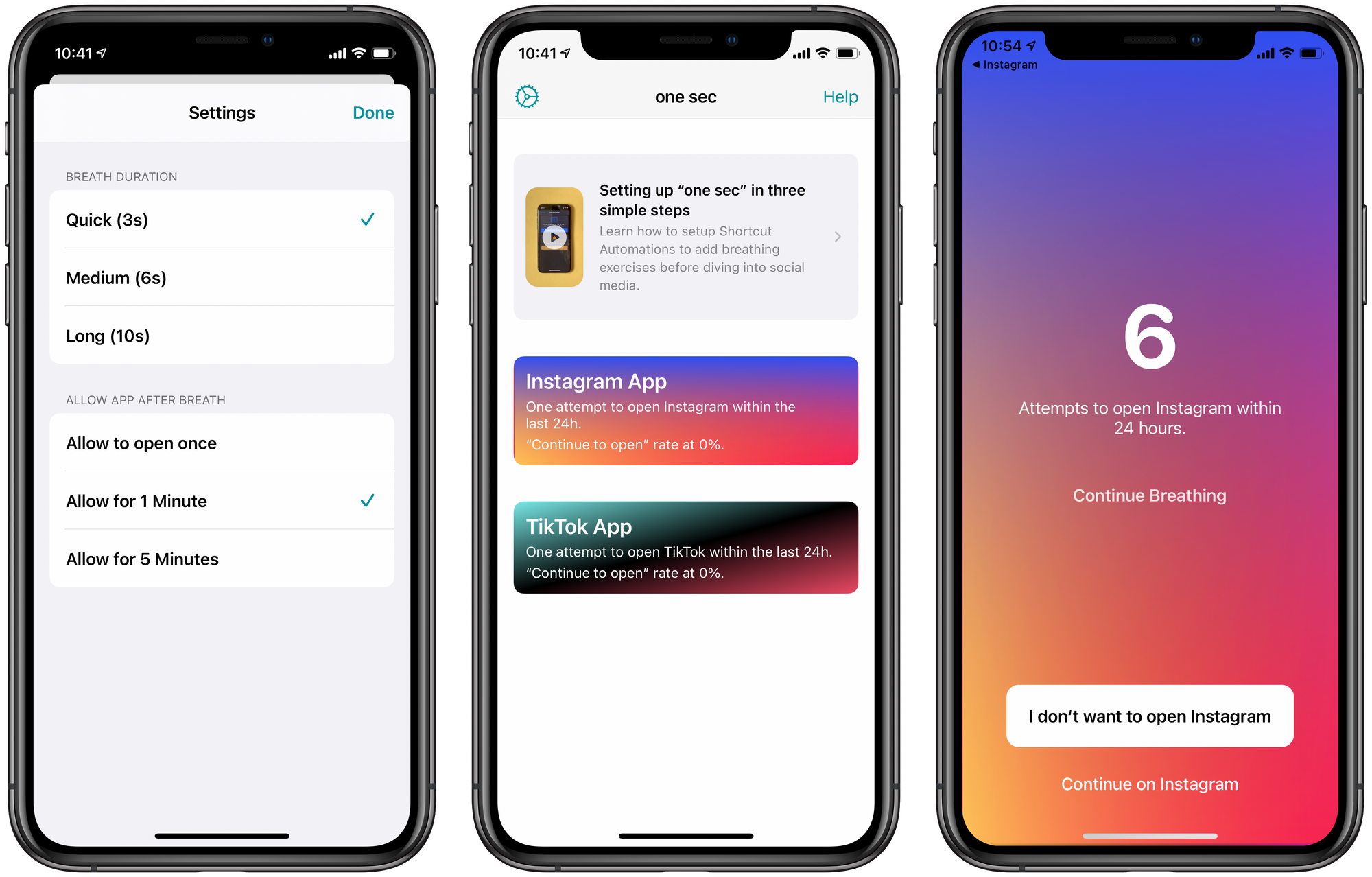
The app has a level of customisation where you can select how long you want the "breathing" to last whenever you launch the app, and also whether you want it to apply if you relaunch the app within a specific period. I have it set to a 3 second duration, and also allows relaunches to be allowed if within 1 minute. That way I think it will cause enough friction to stop me from mindlessly launching things, but also not enough that it annoys me if I quickly go back to it a few seconds later. Because this would also apply if you're switching between apps quickly.
While you use/don't use apps after you're told to take a deep breath, one sec is keeping track of all of this, and displays these stats when you launch an app that is behind the "deep-breathe-wall", and also in the one sec app itself.
Another interesting feature is that when you're told to take a breath, you can obviously choose to open or not open the app, but you can also choose to continue breathing. And this time spent breathing, can also be added to the Health app to count as part of your "Mindful Minutes".
I think I'm going to use this for Instagram and TikTok solely, simply because I think I spend too much time on those apps when I should be doing other things. And a little kick will certainly help. I thought about doing it for Twitter as well, but I don't think the mindless scrolling really happens for me there. But we'll see I guess.
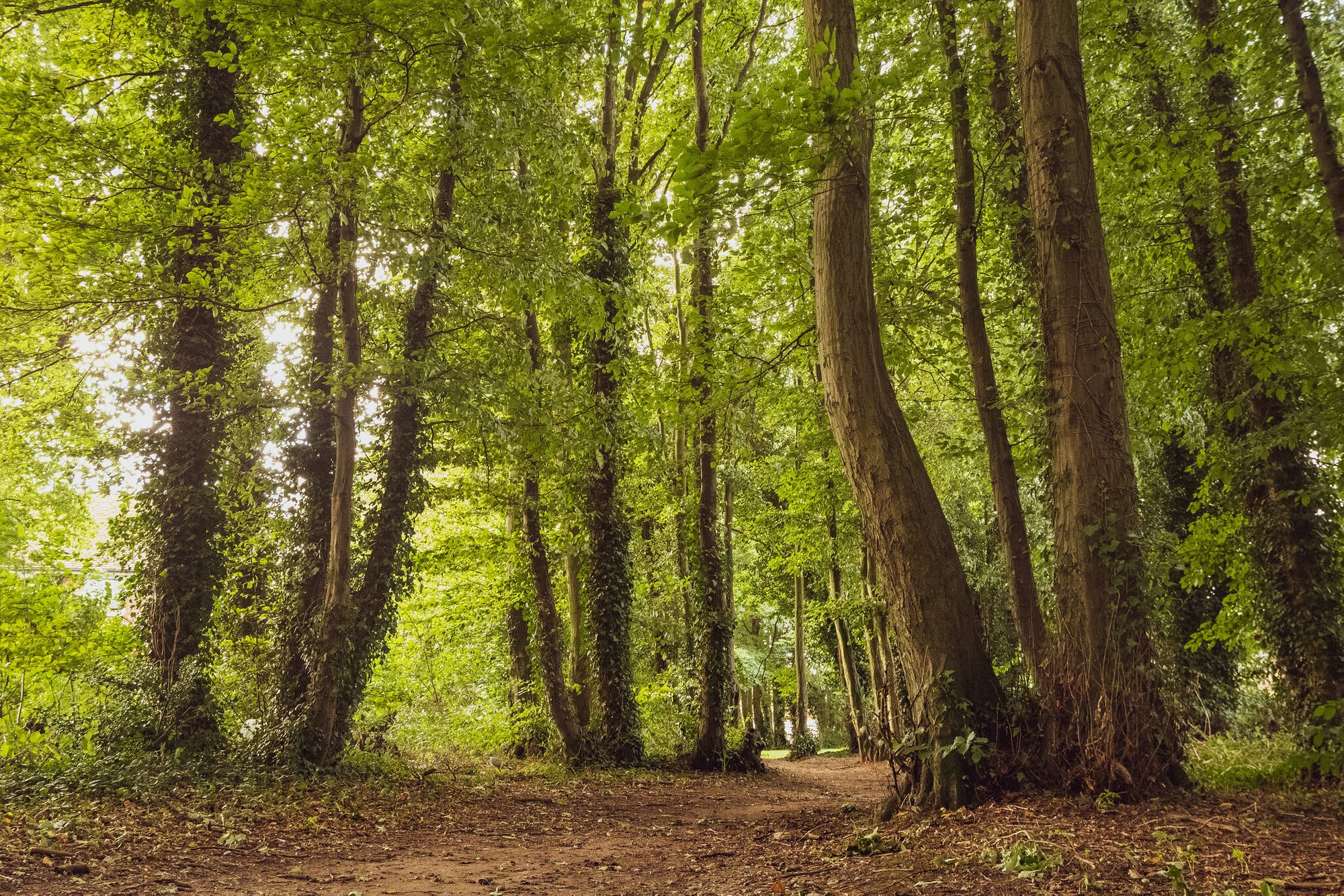
What Is Plant Blindness?
Mary Jo DiLonardo, writing for Treehugger:
Imagine taking a walk in the woods and seeing a deer or a rabbit. You'll no doubt remember the encounter — it might even be the highlight of your outdoor adventure.But what about all the plants, trees and flowers you passed while hiking? There's a good chance you paid little attention to the greenery on your path.That's what researchers call plant blindness.In 1998, U.S. botanists Elisabeth Schussler and James Wandersee defined plant blindness as "the inability to see or notice the plants in one's own environment," which leads to "the inability to recognize the importance of plants in the biosphere and in human affairs."Because of plant blindness, people tend to rank animals as superior to plants, so conservation efforts for plants tends to be limited.
It's an interesting phenomenon, and I think I fall for this as well myself. When I go outside into nature, the plants do take on a more background role. Which makes them much easier to ignore, or at least not focus on, as they tend to blur together as a kind of backdrop.
Not noticing a few plants isn't a problem on it's own. But when you don't notice something that's so fundamental to our environment, it will obviously affect any decision made in regard to the environment. Which when paired with a lack of education around plants, and a higher focus on animals, will most likely create even more ignorance about nature and the environment in which we all live.
Britain and Netherlands Plan to Link Offshore Wind Farms
Will Mathis, writing for Bloomberg Green:
The U.K.’s National Grid Plc and Dutch power transmission operator Tennet Holding BV are developing a plan to link the two countries’ power markets via giant wind farms at sea.The network managers want to use underwater cables to connect as much as 4 gigawatts of offshore wind farms to the power grids of both countries, a move that could open new markets to sell electricity and cut down on times when wind farms are shut off due to oversupply.Interconnectors will only become more important to Britain as its aging fleet of nuclear reactors shuts down, although a new reactor at Hinkley Point C will boost domestic capacity from 2025. National Grid and Tennet aim to identify a first project to lead the plan by the end of next year and be linked by 2029.
It sounds like a brilliant idea to me. Especially the part about oversupply. Imagine having a renewable energy source that's producing more than enough, so you need to shut it down so it doesn't create too much. That's a pretty stupid situation if you ask me.
Inside TikTok's Killer Algorithm
Sara Fischer, wrote a great piece at Axios about the algorithm that powers TikTok. I found it fascinating, simply because I go on TikTok quite a lot, and I must admit they always seem to surface videos that I like.
She wrote about why the algorithm matters, the current situation with TikTok in the U.S., and other updates about the privacy and security practices.
I won't regurgitate everything here, but unsurprisingly, the bit I found most interesting was how it worked:
How it works: TikTok's algorithm uses machine learning to determine what content a user is most likely to engage with and serve them more of it, by finding videos that are similar or that are liked by people with similar user preferences.When users open TikTok for the first time, they are shown 8 popular videos featuring different trends, music, and topics. After that, the algorithm will continue to serve the user new iterations of 8 videos based on which videos the user engages with and what the user does.The algorithm identifies similar videos to those that have engaged a user based on video information, which could include details like captions, hashtags or sounds. Recommendations also take into account user device and account settings, which include data like language preference, country setting, and device type.Once TikTok collects enough data about the user, the app is able to map a user's preferences in relation to similar users and group them into "clusters." Simultaneously, it also groups videos into "clusters" based on similar themes, like "basketball" or "bunnies." Using machine learning, the algorithm serves videos to users based on their proximity to other clusters of users and content that they like. TikTok's logic aims to avoid redundancies that could bore the user, like seeing multiple videos with the same music or from the same creator.