Chris Hannah Chris Hannah

Chris Hannah

BBC Earth - Dynasties Trailer

David Attenborough is back, and he’s going to be taking us through five separate journeys. Each one featuring intense stories, where the future of a dynasty is hanging in the balance, at crucial points of their lives.

The animals we will be following will be the Chimpanzee, African wild dog, Lion, Penguin, and Tiger families.

Watch on YouTube.

Delete Zuckerberg?

As most people may already know, Facebook have been doing some more creepy things with your data. This times it’s sending any phone numbers used for two-factor authentication, to advertisers, so they can use that as another targeting mechanism. TechCrunch have a great article about this if you want to read more.

Bloomberg have made the situation a bit more interesting with their article though, as apparently a Taiwanese hacker, plans on deleting Mark Zuckerbergs Facebook profile. And he plans on broadcasting it live. On Facebook!

I’m definitely going to tune in to see what happens with this one!

It’s scheduled to happen at 18:00 (Taiwan local time) this Sunday (30th September). You can find your exact localised time here.

And now for some links:

Some Nice Additions to Hobi the TV Show Tracker for iPhone

Just as I started using Hobi to track the TV shows I watch, they released a pretty impressive update!

There’s now a new Discover and Statistics section, which really round out the entire app.

In Discover, you can find popular shows by genre or service. Along with collections for what’s currently trending, and also any new or returning shows that are coming this week or month.

The Statistics page shows you some insight on what TV shows you watch. You can see the total time you’ve spent watching TV, how many series, episodes, and also things like what your favourite genre is.

I’m going to start going through all the series that I’ve watched recently and add them to Hobi. I can imagine I’ll have some big numbers in the statistics section.

Download Hobi on the App Store.

Tracking TV Shows with Hobi for iPhone

I’ve started watching more television series recently, and more importantly, a goal to rewatch/watch all the episodes of Pokémon (Best not to go in to that one too much, I’ve been obsessed since I was a child).

Naturally, I decided to find an app that can help me remember where I am with everything, as my memory has never been excellent. After a little search I came up with a few suitable apps, including iShows and SeenIt, but I settled on Hobi pretty quickly.

It integrates with Trakt, which most of them do, so I was grateful to see some of my previously watched tv shows appear in the app immediately. It can also notify you when new episodes air, release dates are announced, or to notify you of season premieres.

It’s topped off with a pretty great design. I like how the most prominent parts of the UI are the cover art, and the name of each tv show. It looks a bit like Things for iOS, and I’m a big fan of the clean aesthetic right now. Especially when it’s joined with slightly larger and heavier fonts.

You can download Hobi for free on the App Store. But they also offer a premium subscription which enables advanced sorting options, no show limits, and also no limits on the number of devices.

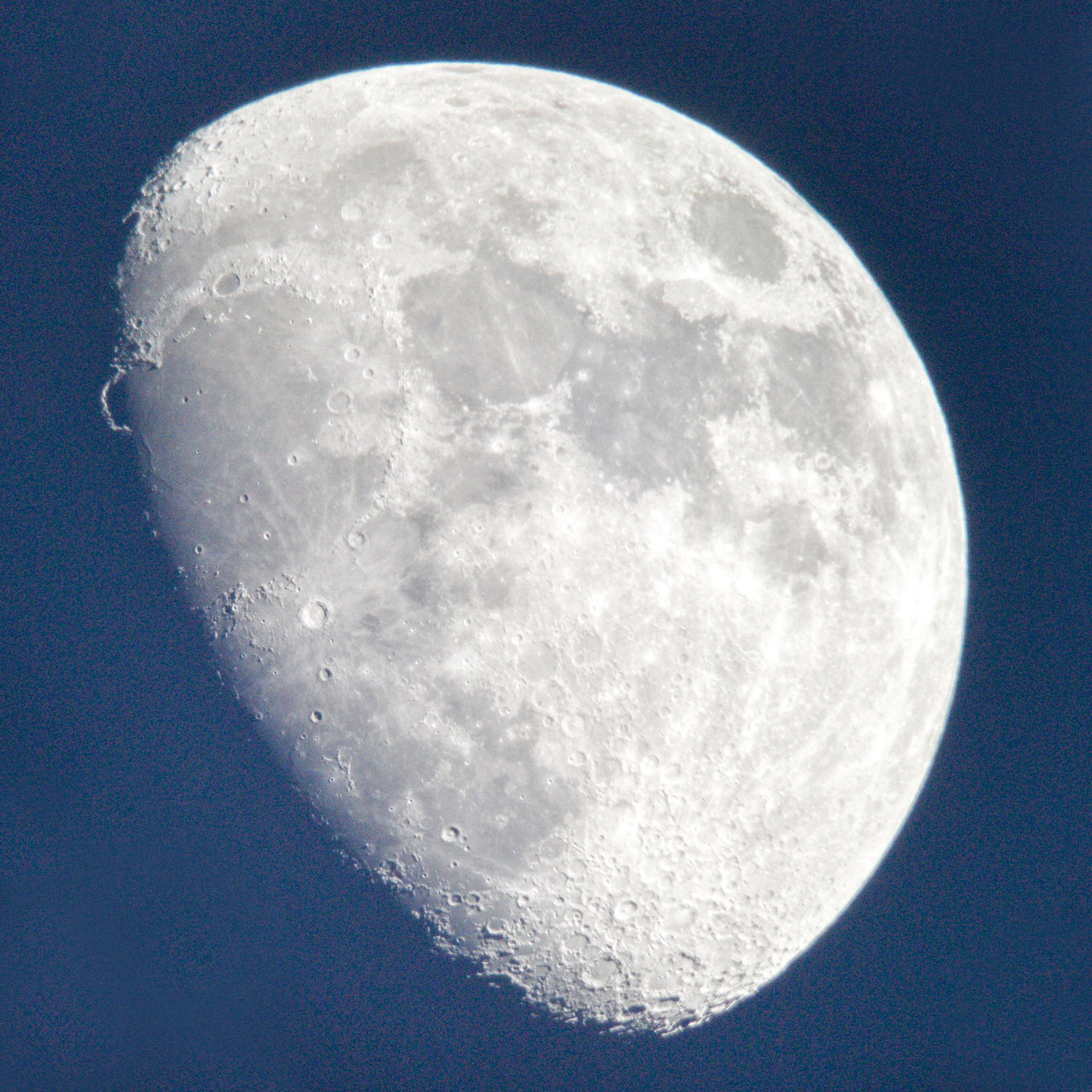
Tom White Photography - Moon

Tom White:

This is a year’s worth of images I took of the moon using just my iPhone 7 through a telescope. The first time I tried it I was amazed by the detail and quality of shot that was possible on a phone, so I set about taking pictures at a various stages throughout the lunar cycle.

I was having a look through this collection of photos, and I was impressed with the level of variety. Even if we are tidally locked, and only ever see the same side, there’s quite a bit of detail to look at.

[Top Photo Credit: Tom White]

iOS 12 Release Day

Yesterday was iOS 12 release day, and it was a pretty good day overall, so I thought I’d share some of my personal highlights.

Of course, iOS 12 and the new Shortcuts app was released, so it was good to see everyone discover the new features that some of us developers and beta users have been playing around with for a while.

I released version 1.3 of Text Case which includes support for Siri Shortcuts. It was covered by John Voorhees at MacStories, which was great! And it was met with a good response from quite a lot of people. It’s by far my favourite app I’ve developed, and it’s been super fun seeing where I can integrate the functionality of Text Case throughout the system.

Then, of course, there’s the annual event for nearly everyone in the Apple community, Federico Viticci’s iOS review! He puts so much work into it, and you can always see that when you read it. This year it’s packed with some great Siri Shortcuts information and even more if you’re a Club MacStories member (which I am!).

There was also a bunch of other apps that released updates with support for Siri Shortcuts, this was great to see from a developer and user perspective. My favourites so far are PCalc, Bear, Ulysses, Citymapper, Overcast, CARROT Weather, and Things. And now that password managers can integrate properly into iOS, I’m also going to look at using 1Password, LastPass, or even one of the many others that have been updated

The best part of the day was probably Twitter, and while it hasn’t received a lot of praise recently, the Apple community is a major reason why I can’t see myself stopping using it. Everyone was happy about the updates, there was a bunch of conversations about Shortcuts, and generally everyone having a good time! I even made a little snark about Mastodon users. Phil Schiller even shared some unfortunate news about the Squirrel from the 4S Introduction event.

Now I just need to wait until my XS arrives on Friday, so I can try out the parts of iOS that I’ve been missing. Like Animoji, Memoji, Portrait Lighting, the new Depth Control, and even FaceID!

Text Case 1.3

It’s been under two weeks since Text Case received its 1.2 update, which contained improvements to title case formatting, and a couple extra formats.

Well in this update, Text Case will now be accessible via Siri! And you will also get to set a different accent colour in the app.

Accent Colour

There’s not that much UI in Text Case, as it’s been intentionally kept rather simple. However there are now 6 colours, that will be used for the navigation bar, switches, and buttons:

  • Pink (Default)
  • Orange
  • Blue
  • Green
  • Purple
  • Black

Siri Support

With iOS 12 now being released, Siri has gotten a whole lot more powerful, and you’ll expect quite a lot of apps to try and make use of it. Which meant I just had to add support to Text Case.

There’s only one function in Text Case, and that is to convert text into various different formats. And that means it’s also really easy to use! The formats will be applied to any text that you have copied, and the formatted text will replace it on the clipboard, ready for you to paste anywhere.

From Settings, you will find the “Add to Siri” option at the bottom. If you tap this, you will then get to select a format, and then record a custom phrase.

Siri Shortcuts

That’s not all the ways you can use Text Case with Siri. Because as you use Text Case, iOS will learn what formats you are using, and begin to suggest them to you.

These suggestions will also appear in the new Siri Shortcuts app, where you will be able to automate them with everything else!

Here’s just a few examples:

Download the Shortcuts:


You can find Text Case on the App Store.

Text Case 1.2

It’s time for the second major update to Text Case!

The first update added the ability to pick only specific formats to enable in both the app, and the action extension. It also added 5 extra formats.

The change in 1.1 to limit formats was partially due to the fact more formats could be added in the future, and it wouldn’t inadvertently affect users that didn’t want to use them.

In 1.2, the biggest update is the added flexibility in the title case format. As formatting titles isn’t a necessarily fixed style, but rather there are many different ones that writers use. The ones I’ve selected to include are:

  • Associated Press (AP)
  • American Psychology Association (APA)
  • Modern Language Association (MLA)
  • Chicago Manual of Style (CMOS)

And of course there are two new formats, sentence case, and Pascal case.

I hope you all enjoy the new additions, and if you ever have an issue with the app, or even have a suggestion, let me know by email or on Twitter.

You can find Text Case on the App Store.

enter image description here

Yet More Leaks

As usual, Apple can’t seem to keep things secret anymore. Leaks are now emerging of the new iPhone XS that will be announced at the event on the 12th September.

I have completely mixed feeling about it this time. It’s a real shame that some of the surprise from the event has been somewhat spoiled. I don’t mind a few bits of information being leaked, but when it’s marketing images of a new product, it feels like someone has really screwed up.

Some people will surely point the blame at the people like 9To5Mac that make these things public, but that’s their job, to release interesting news. And it will certainly interest a lot of people.

I’ve read one article from 9To5Mac which includes an image of the iPhone XS, with new sizes and colour, and I’ve seen a few photos of a new Watch face, but I’m going to try and stay away from anything else. It will be pretty hard, seeing as I follow a lot of blogs that will cover it, and it will be all over Twitter, but I’ll manage.

Guilherme Rambo‏, the main investigator of Apple related leaks nowadays, said that a lot of information is coming from some test streams that Apple clearly didn’t think people were watching:

Apple just can’t seem to keep it in their pants anymore.


I would like to note that I won’t be writing about these leaks, or sharing other links to anything else that may come out. I don’t hold anything against anyone that reads, shares, or does anything with the information. I’ll just try and wait until the official announcement.