Vote for Your Pokémon of the Year
It’s getting close to Pokémon Day on the 27th February, and Pokémon have teamed up with Google to let people vote for their favourite Pokémon.

You just need to search “Pokémon Vote” on Google to get to the poll, and once you’re there you’ll be able to vote for your favourite Pokémon from each of the 8 regions (Kanto, Johto, Hoenn, Sinnoh, Unova, Kalos, Alola, and Galar). It includes all 890 Pokémon from there National Pokédex in Sword/Shield.
Here’s what I voted:
- Kanto – Bulbasaur (Best Pokémon ever of course!)
- Johto – Celebi
- Hoenn – Torchic
- Sinnoh – Luxray
- Unova – Tepig
- Kalos – Dedenne
- Alola – Litten
- Galar – Grookey
Find more details on the Pokémon blog.
Turns Out Some Children Own a Smartphone
Zoe Kleinman, writing for BBC News:
The amount of young phone owners doubled between the ages of nine and 10, which Ofcom dubbed “the age of digital independence”.
In addition, 24% of 3 and 4-year-olds had their own tablet, and 15% of them were allowed to take it to bed.
This doesn’t seem to bad to me. A smartphone gives people access to the vast quantities of information available on the internet, entertainment in the forms of games, videos, etc. and also a tool for communication with their friends and parents.
But there’s always at least one quote in these types of articles, to try and prompt a bit of outrage. Here we have one about not recognising the difference between the real world and online:
“I’m conscious that for these children who have never known a world without the internet, in many respects their online and offline worlds are indistinguishable.”
And also one trying to prompt outrage at the suitability for content on the internet for children:
“We are seeing around half of 12-15 year olds saying they have seen hateful content online, and an increase in parents who are concerned about it,” said Yih-Choung Teh.
I think the problem is not that children have access to mobile computing devices, but rather some parents tend to think that they don’t need to control their child’s usage of such devices. You look after them in the physical world, so surely you’d expect to do the same in the digital world.
Back before smartphones were a thing, people grew up without constant access to the digital world. But now they are so ubiquitous, it’s obvious that more younger people will have access to smartphones, and especially the vast internet. I think the responsibility falls on the shoulders of both the parents, the education system, and also the various content platforms.
However, I don’t think the fact that children use the internet, means that the entire web needs to be child friendly.
Honk More, Wait More: Mumbai Traffic Police Introduce the Punishing Signal To Curb Noise Pollution
Quaid Najmi, writing for the India News section of The Weather Channel:
From Friday (January 31, 2020), it has installed decibel meters at certain select but heavy traffic signals to deter the habitual honkers through a campaign named ‘The Punishing Signal’.
Joint Police Commissioner (Traffic) Madhukar Pandey said that the decibel monitors are connected to traffic signals around the island city, and when the cacophony exceeds the dangerous 85-decibel mark due to needless honking, the signal timer resets, entailing a double waiting time for all vehicles.
This is absolutely brilliant.
iPad, 10 Years On
Matt Birchler, with his 10 year review of the iPad:
10 years ago the iPad was “about to replace the personal computer.”
Today the iPad is “about to replace the personal computer.”
10 years from now I suspect the iPad will be “about to replace the personal computer.”
Meanwhile, people like me and millions of others will continue to work on an iPad, not really trying to prove a point, just trying to use the best tool for us.
When Steve Jobs debuted the iPad in 2010, he described it as a device that would live between a laptop and a smartphone. By that measure, I think the iPad has more than lived up to that positioning, and I don’t think anyone would disagree. It’s more capable than an iPhone, but not as capable as a Mac.
I’m with Matt on this one.
Whether the iPad can replace whatever “computer” you have currently, it doesn’t diminish its use for other people. Where I see the iPad now, is that it is simply another computer, just another option with different advantages and drawbacks. A few years ago I would have edged towards the perspective of the three devices (iPhone, iPad, and Mac) having a certain order of capability, but I don’t think that’s the case anymore.
The iPad has its drawbacks, sure, but it’s also a relatively young device. From where the iPad started 10 years ago, to where it is now, it’s pretty impressive in my opinion. Especially when you have people running their entire business from an iPad.
Ligatures in Programming Fonts: Hell No
Matthew Butterick, on the use of ligatures:
Ligatures in programming fonts—a misguided trend I was hoping would collapse under its own illogic. But it persists. Let me save you some time—
Ligatures in programming fonts are a terrible idea.
And not because I’m a purist or a grump. (Some days, but not today.) Programming code has special semantic considerations. Ligatures in programming fonts are likely to either misrepresent the meaning of the code, or cause miscues among readers. So in the end, even if they’re cute, the risk of error isn’t worth it.
His post certainly opened my mind up to the problems with ligatures in a programming font. It actually made me switch away from the new monospaced typeface from JetBrains, simply because of its use of ligatures, 138 code-specific ligatures to be exact.
Back to SF Mono it is.
Decline - 25 Stickers To Help You Say No
I can’t say I’ve purchased many iMessage Sticker packs since they were added way back in iOS 10, but Timothy Buck let me know about Decline, a sticker pack made in partnership with his wife, Alyssa Guerrero, and it’s pretty great.
With it, comes 25 different ways to say ‘No’.
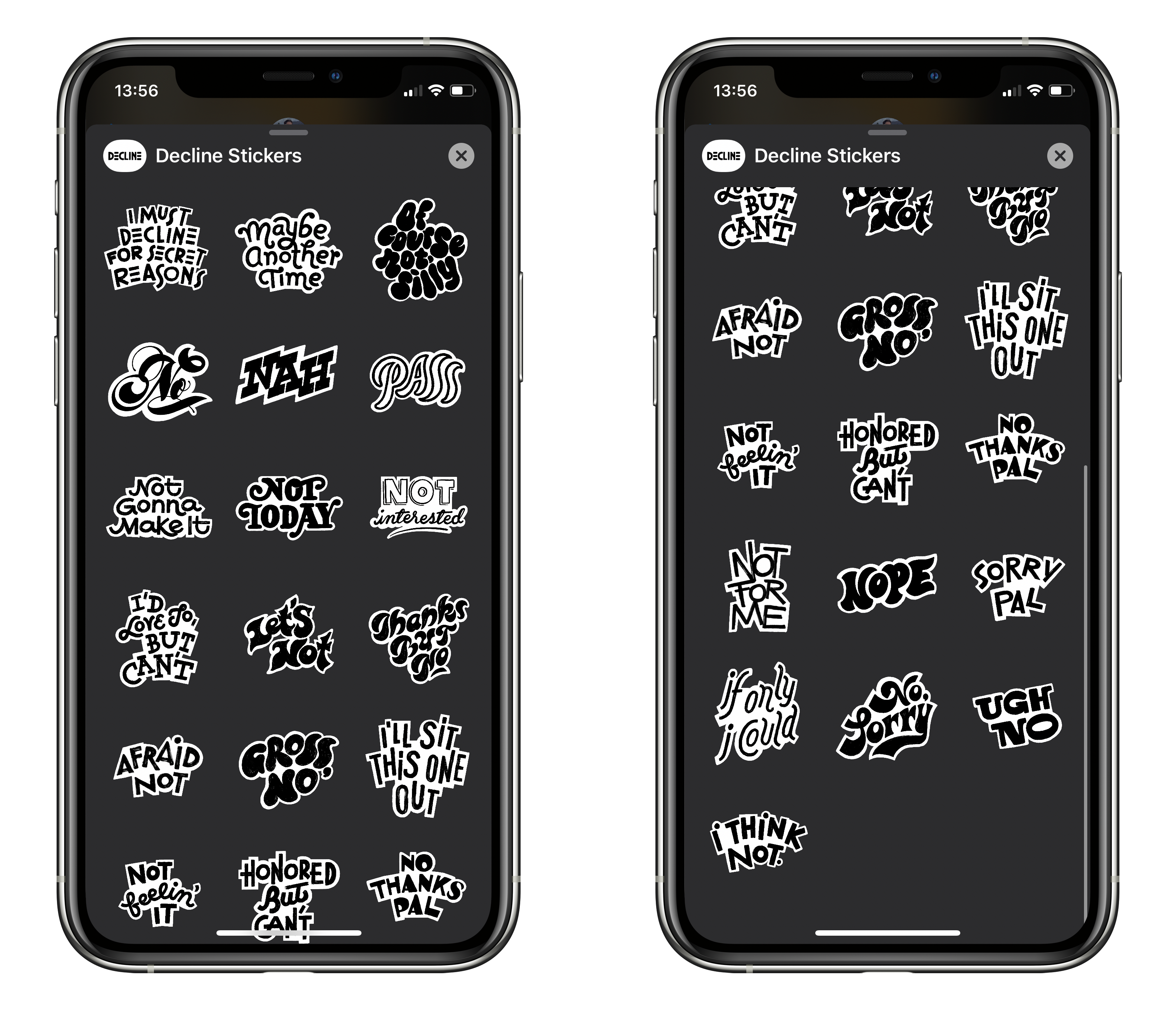
A simple ‘Nah’ or ‘Pass’ may sometimes suffice, but maybe you want to show your disgust with ‘Ugh no’, or the mysterious ‘I must decline for secret reasons’. Either way, they’re pretty funny!
They’re available to purchase on the App Store, and if you want to get physical, you can purchase physical stickers too.
Timothy also shared a video showing the lettering process, so you can see how the individual stickers are made.
Samsung’s New Ballie Robot Is Like a Real-Life Mini BB-8
Jay Peters, writing at The Verge:
Today, at Samsung’s keynote at CES, Samsung introduced Ballie, a small ball-shaped robot intended to help you around the house. Samsung says Ballie utilizes AI to be a security robot, a fitness assistant, a tool to help seniors connect with smart devices in their homes, and it can even be a friend to your kids and pets.
In an onstage demo, Ballie followed Samsung consumer electronics division CEO H.S. Kim on the stage by rolling around, seemingly by using the camera to track Kim as he walked across the stage. Ballie also gave cute little robotic chimes in response to a couple of commands from Kim, and it even rolled right into Kim’s hands when he called for it.
Meet #Ballie, Samsung’s human-centric vision of robots that takes personalized care to the next level. The small rolling robot, “understands you, supports you, and reacts to your needs.” #CES2020 #SamsungCES2020 pic.twitter.com/YzwgZN1Lgw
— Samsung US Newsroom (@SamsungNewsUS) 7 January 2020
I need one.
I don’t care about it opening the blinds, turning on TVs, or anything. I want a little robot that can make whimsical noises, look remotely like a BB8, play with my cat, and do absolutely nothing else.
Where do I send my money?
Saying Goodbye to a Few Apps
I’ve been talking about this for a few years, but refining my App Store offerings has always been a target of mine. And today I’m taking another bit of action on that.
Which means my list of 8 products on the respective App Stores will go from 8 down to 5, by retiring Pretty Regular Expressions for macOS and iOS, and Tap Gap:
- Text Case iOS/iPadOS
- Text Case macOS
- Pixels Sticker Pack (iMessage Sticker Pack)
- SOLID – Wallpaper Generator
- Qwiki
Pretty Regular Expressions iOSPretty Regular Expressions macOSTap Gap – Fast Paced Accuracy Game
The reasons behind the three of them are slightly different but are essentially due to a lack of focus from myself, and a desire to not have any lingering apps anymore. Especially if I feel like they’re offering a substandard experience.
Pretty Regular Expressions is an app that is arguably still useful, but I haven’t used it myself in quite some time, and it’s fallen way behind its competitors on both platforms. And it’s just in a good state, it hasn’t really been adapted to the new devices over the years, and there’s tons of work needed to bring it back to a good level. There’s still a chance that I’ll revive this in the future, as I plan on working on a fresh app this year, but I can’t make any promises.
And for Tap Gap, this is a really simple game that I made while at university. It’s wasn’t ever a great game, and it was last updated December 2016, so I’m not even sure it works on the new devices. That was an easy decision.
There’s also question marks over my solid colour wallpaper app, SOLID, and my Wikipedia Menu Bar app for Mac, Qwiki. However, these still function correctly and attract new users.
That leaves me with arguably one active product, Text Case, since the macOS app is built with Catalyst, meaning it’s essentially one codebase. And three passive products with the sticker pack, Qwiki, and SOLID.
How To Expand Launchpad
Shihab Mehboob (@JPEGuin) shared a useful tip on Twitter, where you can expand the amount of rows and columns in Launchpad.
Turns out you can do this by altering the following values via Terminal:
defaults write com.apple.dock springboard-rows -int 8
defaults write com.apple.dock springboard-columns -int 8
For these changes to have effect, you’ll need to restart the Dock. You can do this via Activity Monitor or by typing killall Dock.
Here’s what mine looks like on my 16″ MBP:

So much better than the massive icons that come by default.
Kohler Puts an Alexa-Enabled Smart Speaker in a Showerhead
James Vincent, writing at The Verge:
If you like to listen to tunes in the morning, then Kohler has just the over-the-top product for you: a portable smart speaker with built-in Alexa that slots right into your showerhead.
I’ll be adding this to the list of things that I don’t think need to exist.