Apple Responds to Gatekeeper Issue With Upcoming Fixes
Romain Dillet, writing for TechCrunch:
Apple has updated a documentation page detailing the company’s next steps to prevent last week’s Gatekeeper bug from happening again, as Rene Ritchie spotted. The company plans to implement the fixes over the next year.Apple had a difficult launch day last week. The company released macOS Big Sur, a major update for macOS. Apple then suffered from server-side issues.Third-party apps failed to launch as your Mac couldn't check the developer certificate of the app. That feature, called Gatekeeper, makes sure that you didn't download a malware app that disguises itself as a legit app. If the certificate doesn’t match, macOS prevents the app launch.
A pretty embarrassing bug for such a big day.
Matt D'Avella on Downgrading to a Flip Phone
The new iPhones are out, and therefore Matt D'Avella has decided to buy a flip phone. Not a fancy super-expensive flip phone that's still a smartphone, an actual original flip phone. To be honest, that screams "extra" to me. It sounds like a fun hipster idea that won't really last.
He points out that smartphones are designed to be with us on the go, giving us a mobile computer when we are out of the house. And with most people not leaving their houses for anything other than a walk or to go to a supermarket, there's not much use to them. Although, weirdly, I'm pretty sure people are just sat inside their houses on their phones anyway.In his video, he went over the reasons why he's decided to downgrade from his iPhone, and the potential upsides to having a less-smart phone. As usual, it's one of his 30 day challenges, so it will be interesting to see how he gets on.
The Perfect iPad For Me
I wrote a post a while ago about how I was trying to automate saving money by writing more, and the goal of that saving was to purchase an iPad Pro 12.9”. But I don’t think I actually need an iPad Pro. My mind was only set on the Pro because I want the bigger size.
In fact, this relates to what I said in my post about the M1 chip. Since I talked about how Apple designs products to fit a use case, and instead of just working out what the best device is, I need to work out what my use case is first. And the thing is, although I play some games on my iPad, what I’ll mostly use it for is writing, reading, browsing Reddit, etc. Nothing particularly taxing.
Sure, I want a machine to be powerful enough so that nothing felt slow, I don’t want to be constantly pushing the machine. But I’m pretty sure the new iPad Air is capable of everything I’d throw at it and more. The only problem being the screen size. I think my perfect iPad would be an iPad Air 12.9” (or similar). Maybe two USB C ports would be nice, so I could plug in a charger and monitor without using a cable, and even have space for more accessories. But the monitor I have can power an iPad with the same USB C cable, and I don’t actually use any accessories apart from a Bluetook Keychron K2 keyboard, and a cheap USB mouse. Although that’s going to be upgraded eventually.
To be honest, I can’t see Apple bringing out a bigger iPad Air. I think it would start to add just a bit more confusion between the Air and the Pro models. And also, if you look to the iPhone and MacBook, the larger size for both of those models are only available to the Pro. I’ll probably have to end up getting whatever 12.9” iPad comes out next, and I assume that will be a Pro model next year.
The MagSafe Wallet on Each Size iPhone
If you had any thoughts on how the MagSafe Wallet would like like on each iPhone, then Greg Morris has you covered:
Yeah, I'm that guy this year. I couldn't decide which iPhone size I wanted, so I got them all. It's a weird position to be in but also provides me with some deeper insights into the real differences. I am not talking about specs and all those kinds of figures that people get too caught up in, the real things that make a difference to actually using the device. One of the strangest ones I have had to think about this year is the MagSafe wallet — so here is how it fits with each size iPhone.
I think the MagSafe wallet pairs really well with the new iPhones. It seems to fit all sizes without looking out of place, and also it’s a perfect item to be used with MagSafe.
After seeing Greg’s article, and his video showing the unboxing and answering a few questions, I think I’ll hold off buying one for now. I use a very small card wallet right now anyway, and only use 2 cards, so it seemed like a good fit for me. But seeing as the magnets aren’t as strong as I expected, and you still need to detach the wallet from the iPhone to use it. I think I’ll just wait and see.
Here is Greg’s video on the wallet:
Castro's New Queue Widgets
Castro has just announced over on their blog that widgets have finally arrived. They come in three different sizes, and they each offer a different level of information regarding your queue.
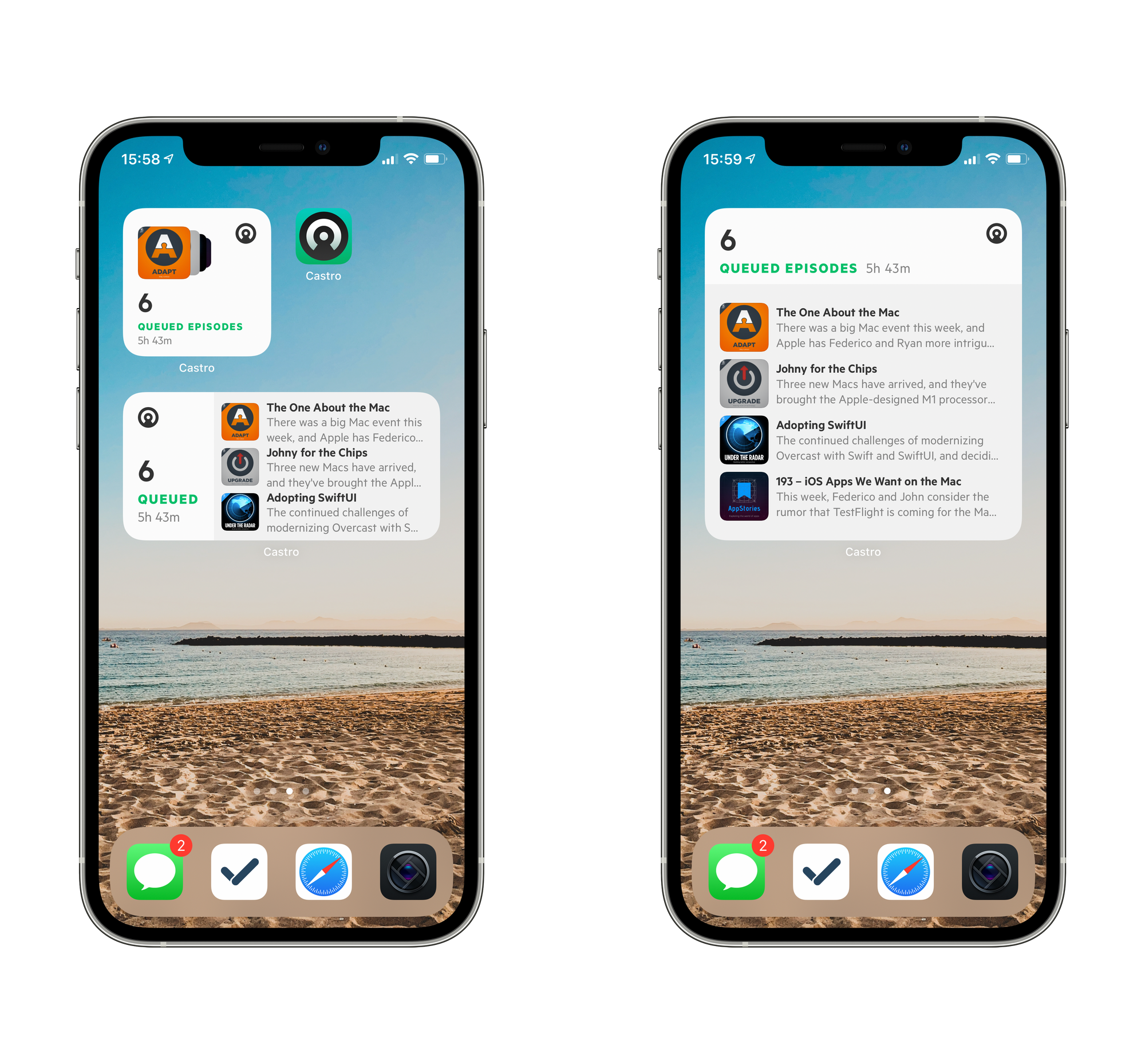
In the small size, you'll be able to see the number of episodes in your queue, along with the total duration, and if you tap anywhere on the widget it opens to your queue. With the medium size, it has the same idea, except you see the title and a short description of the next three episodes. And the large size is the same but bigger, and with one more episode.
These widgets look great, and they're already better options than the ones that are available in Apple Podcasts app. I use the small Podcast widget on my home screen, just so I can quickly go back to a podcast I was listening to. But it's definitely lacking any real detail. Whereas, with Castro's small widget, you can see how many episodes you have in your queue and even artwork for multiple upcoming shows.
Another cool feature is what you get when your queue is empty. With the medium and large sizes, you get the option to jump straight to Inbox or Discover if you've got nothing in your queue. That's pretty handy.

I think now I've gotten used to launching Podcasts via a widget on my home screen, I'm going to give Castro a good try with one of the new widgets. I've always liked the idea of a queue, and I think I prefer the design over Overcast. Overcast is a really good app, and I used it for years, but it doesn't seem "fun" to me, and when it comes to apps, I like it when the design has a bit of character.
Hopefully, I enjoy using Castro, because I'm a big fan of these widgets.
You can find Castro on the App Store, and you can read more about the widgets on their blog.
More Thoughts on Apple Silicon Macs
I’ve been doing a lot of thinking about the Macs transitioning to Apple Silicon today. I started focussing on the differences between Mac models, and also how they can improve the chips in order to transition higher-end Macs like the MacBook Pro 16” and even the Mac Pro.
It sounds like a mammoth task, especially when the Mac Pro has a configurable option for a 28-core Intel Xeon processor. And also that much larger memory options than 16GB exist, with quite a few people finding the sound of 16GB too low anyway.
However, as I’ve been using my iPad Pro 10.5”, I started to think about how well this performs. It came out in 2018, and iPads have come a long way since (which is also why I plan on moving to a 12.9” soon). But still, I have never experience a time where I feel like the machine was too slow.
When Apple announce a new iPad, they tell us what chip it has, and in relative terms how much more capable it is. But when it comes down to it, most people don’t really care what chip is in their device. They just want to use the device for the tasks that they want to achieve.
That’s something that I think Apple has really achieved with the iPad platform. With models being separated into the iPad, iPad Mini, iPad Air, and iPad Pro, you don’t need to know the technical details, you just need a rough idea of what type of use you want to use the machine for. If you want to use it as a consumption device, maybe you just need the base iPad, or if you’re working with big video editing tasks, you may want to opt for the Pro.
All I’m saying is, with the iPad, you match the model to the job you want it to do. But with Macs, you also had to choose between processors, which is something the ordinary person probably doesn’t know too much about. So if Apple starts using the same line of thinking with the Mac lineup, maybe the choices will become even simpler?
I think if you break the lineup into three categories, laptops, workstations, and desktop computers, they can start to be easier to understand:
- MacBook Air
- MacBook Pro 13”
- MacBook Pro 16”
- Mac Mini
- Mac Pro
- iMac 21.5”
- iMac 27”
- iMac Pro
In most cases, you’ll know what type of Mac you want, you just need to pick which variant. For example, if you wanted to pick a laptop, you could be left with two questions, “Do I need a Pro model?”, and “Do I need the bigger screen and graphics capabilities?”
If each model comes with its assumed uses, Apple can design each model to fit. Which means the messaging to customers can be even simpler. You want a portable Mac for typical use? MacBook Air. You still want it to be as portable, but also need some more power? MacBook Pro 13”.
Apple would essentially be saying, no matter what your use case is, there’s a Mac for the job, and it just works.

The Secret She Keeps
I can’t say I’m one to write regularly about the various films and series that I watch, here on this blog. But I just finished watching a short series on BBC called The Secret She Keeps, and although it’s only 6 episodes long, I found it rather gripping, and intriguing.
I won’t spoil the plot, but the story is about two different pregnant women come together, while major secrets in their lives start to see the light and some that are quite shocking. At a few points, the storyline can be predictable, but there’s still enough plot twists to keep you on your toes.
So while I won’t say this is a masterpiece, it’s a gripping series, that will certainly keep you entertained.
You can watch it on BBC iPlayer.
One reason I decided to write a short post about this series is the IMDB score, it’s got just a 6.8, and for some reason, people rate it pretty low. I’ve found that with a lot of films and series that I enjoy have rather low ratings, so maybe I should start writing more about them.
The M1 Chip
So Apple has finally announced the first Macs that will run on Apple Silicon. To be specific, there is a new MacBook Air, MacBook Pro 13", and a new Mac Mini. And they all have the new M1.
This is still early on, and there's bound to be more information as time goes on, and as people eventually receive their machines. But, it leaves me with some questions regarding the M1, Apple's idea behind the Mac lineup, and Apple Silicon in general.
Is an M1 always an M1?
With all three new Macs having the M1 chip, I assumed that the only difference in power would be related to how much power it uses, and the thermal capacity of the machine. As in the Mac Mini is plugged in constantly, so it can draw more power. And the MacBook Air doesn't have a fan, so it needs to maintain a lower temperature.
But while it appears that the M1 is the same across the models, there is one machine which has a slight variant. The cheapest MacBook Air for some reason has an M1 with a 7-core GPU. And all of the other machines have an 8-core GPU.
So are all M1 chips the same? Does the "7-core GPU" variant actually have 8-cores, but one's switched off? Or did they literally make two options of the same chip, with 1 GPU core being the difference? If they are physically different, is does M1 represent a chip family?
Is CPU configuration now dead?
With the new M1s being the same, apart from the weird MacBook Air situation, there is now one less thing you can configure when purchasing a Mac.
Sure, you have the option of a 7-core or 8-core GPU on your MacBook Air, but this is not configurable in the same way that memory and storage are.
Maybe from now on, the chip will determine the model. And if Apple does start to separate Mac models by chip variants, will we ever be told more about them apart from the number of cores and the iteration?
What chip will be in the next tier of Macs?
Even if we class the Mac mini, MacBook Air, and MacBook 13" models as being transitioned to Apple Silicon, there are still four more models that run exclusively on Intel chips, the MacBook Pro 16", iMac, iMac Pro, and the Mac Pro.
I think they will obviously feature higher performant chips than the current M1 chips that are available. But I wonder how far they will go, and at what rate. Because although the MacBook Pro 16" is a laptop, it's the high-end model, and will therefore need to be much more powerful than the 13".
But when it comes to the other three models, they all have one benefit over the laptops, in that they have a constant power source. And the Mac Pro can go even further due to it's larger size.
Apple said they wanted to transition the whole Mac platform to Apple Silicon in around 2 years. But I wonder if this means only having Apple Silicon Macs available, or just by having an Apple Silicon option of every Mac, while still selling various Intel variants.
How many chip variants will Apple sell at once?
This isn't exactly a major question, but it will be interesting to see how many Apple Silicon chips will be available to buy at a single time.
When the whole platform has transitioned, I wonder if at one point they will all run the same M class chip with variants on certain models. And at what rate are they upgraded?
The iPhone chips are updated every year, so it will be good to see the same behaviour for M chips. Although would that mean every Mac gets updated every year? Or just certain models?
Is the memory limit a problem?
The Macs that have the M1 chip are all limited to a maximum 16GB memory. That doesn't seem great to me, since the Intel MacBook Pro 13" supports up to 32GB memory, double its replacement.
Maybe this is a technical limitation? I thought initially that it was a limitation from the M1 chip, but I've also seen suggestions that it's due to the type of memory, or even due to the heat generated from larger amounts of memory. So it could even be a product decision.
And although the limit is pretty small, will it actually be a problem? iPhones have much less ram than Android phones, and they're by no means slow. So maybe the tight integration of Apple Silicon and macOS will create the same benefit, and memory will go further on Apple Silicon than an Intel equivalent.
These are the questions I have right now, and I bet there's a load more that others want to be answered too. We'll simply have to wait and see what happens.
What's the Deal With Apple and Power Adapters
I'm not sure what has gotten into Apple recently, but they seem to have developed an aversion for including power adapters with products that require power adapters.
The reason for not including it in the new iPhones is supposed to be environmental. I don't fully believe that, but I'll let that one slide for now.
The fact they remove the power adapter from already existing products, without altering the price, tells you that it's not fully environmental reasons.
But when you think that one of the biggest features of the new iPhones is MagSafe, you would expect that a lot of people will be purchasing a MagSafe cable. That MagSafe cable costs £39. It also doesn't come with the required 20W power adapter. That comes separately at a cost of £19. So, £58 for a cable and power adapter which is meant to be the new way of charging your phone.
When looking into the Watch charging options, I came across the Apple Watch Magnetic Charging Dock, which I had completely forgotten about. Released in 2015, it's essentially the charging disc of the Watch charger, but at a 90° angle, on top of a small circular base. And that will set you back £75. It requires the old 5W power adapter, and that will cost you another £19. So all together, it costs £94 for an Apple branded Apple Watch charging dock.
Coming soon is the MagSafe Duo charger, a small foldable case which contains a typical MagSafe wireless charger, and a magnetic Watch charger. To use this charger, you use a single Lightning to USB C cable, plugged into the 20W power adapter. Except again, the power adapter doesn't come in the box. Alongside the £129 it costs for the charger, you will again need to spend another £19 on the power adapter, bringing this solution to £148.
I'm not sure if Apple is trying to make this a new normal, where products that require power adapters simply do not come with them. But to me, it seems absolutely ridiculous.
I Don't Like It When Apps Change Their Tab Bar Items
In the past few weeks, two apps I use a lot on my phone have changed the layout of their tab bars. It sounds like something that you couldn't get annoyed about, but here I am. I'm sure this annoyance happens to other people, and to other apps that I don't use, but the two that are bugging me today are Instagram and YouTube.
Okay, so putting aside the fact that Instagram seems to change their interface weekly, with the option to create a new post or story being moved all around the interface. They clearly do this only for a few users, as a lot of people I know haven't seen any kind of change. But at least for me, every week there's at least one thing that's moved.
For now, I'll focus on the tab bar. Although, who knows, it might even change tomorrow.

So what I have now is five items, Home, Discover, Reels, Shop, and Profile. I get that they want to push Reels as a feature (even though I think it's terrible), and yes you can buy things on Instagram now (I also think this is bad). But why do these items need to fill up 40% of the tab bar?
I liked having the Activity item in the tab bar before, but you could argue that regularly checking your likes, comments, and follows isn't that healthy. So moving that away from the tab bar, and adding just a tiny bit of friction may be helpful for some people.
But what about the most important part of Instagram, posting photos? Surely that deserves to be the most prominent action in the UI. Rather, it's (currently) in the top left, at least for me, and only when you are on the Home screen. Weirdly, if you are on your profile you also have a button in the same place, but this is just to open a list allowing you to create a post, story, highlight, IGTV video, or Reel. Why there needs to be 5 content options is beyond me.
YouTube
This change isn't as drastic as what Instagram is doing, but it still messes with my muscle memory a lot.
The change here is the addition of the Create button in the centre. Although pressing this doesn't actually take you to the upload interface. Instead, you get a boring list interface like the Create option on Instagram. But here you only have two options, to upload a video, or to start a live stream.[1]

It's sort of the opposite of Instagram, where the changes there are to make you view Reels and use the shopping feature. But in the YouTube app, they seem to want you to create more.
I would argue that the opposite is how people use these platforms. Sure, a lot of people upload videos to YouTube, and maybe some people like to watch Reels and shop on Instagram. But at least in my mind, YouTube is the app where the majority of people would be consuming content, and Instagram is the place where you are more likely to be sharing content. Also seeing as the phone app is the only place where you can post images, since there is no iPad app (which I think is totally idiotic), and you can't upload anything on the web interface.
Most of the time when apps change their UI, the annoyance is purely down to muscle memory and having to readjust to a new layout. But these changes just seem to be stupid to me. They seem to be geared towards attracting desired behaviour like shopping or starting live streams, rather than showcasing features that users do more often.
These two options are also totally pointless for me. Seeing as I don't upload videos, and if I try to start a live stream I get told I'm not actually eligible to stream from a mobile device. ↩︎